Soundpeats Air5 Pro Box

Soundpeats Air5 Pro LDAC ANC Earphones Review

Soundpeats Air5 Pro Review: Affordable Hi-Res Earbuds With Adaptive ANC

Finding true wireless earbuds that balance hi-res sound, strong noise cancellation and comfort often means paying premium prices. Brands like Sony, Bose and Apple dominate the high-end, but Soundpeats has been building a reputation for delivering excellent value. Their latest release, the Air5 Pro, aims to offer flagship-style performance at a far more accessible cost. I was so eager to try these, I actually opened them & started using them straight away. Normally, I would take photos of earphones before using them, but I live by a loud road & it’s getting harder to hear my podcasts on my daily walks, so I was desperate to test out the noise-cancelling. I’ve not been disappointed. As usual for sound peats, they come well packaged & they feel premium. The charging case is great & I’ve only needed to recharge it once since getting the Air5 Pro’s. Read More....

Soundpeats Q40 HD Box

SOUNDPEATS Q40 HD Neckband Sports Bluetooth Headphones Review

I’ve had so many pairs of Soundpeats headphones & earphones over the years & they have possible the best quality to price ratio of any tech I use. The Q40HD are their updated sports earbuds and I just had to give them a go. I have an older pair of these I love when I go running. For me, these are ideal because they are wireless, but also a necklace type earphone. You can remove them from your ears and connect the earphones with their magnets to create a necklace, which keeps them in place when running by a busy road or when I need to hear. Much more convenient than a standard wireless earbud or headphones. Read More....

Soundpeats PearlClip Pro packaging front

Soundpeats PearlClip Pro earphones review

Soundpeats PearlClip Pro

I’ve been rocking these SoundPeats PearlClip Pro earphones for a month or so now, so thought it was about time I did a short review of these little beauties. They are currently available on Amazon with money off, so I can 100% recommend grabbing a pair. Let’s dive into the review.

I’ve been looking for something to replace my wired apple earbuds for a while now. Since upgrading to an iPhone 16 Pro and requiring an adaptor to convert USB-C into a 3.5mm jack, I was thinking of grabbing a pair of wireless earbuds. The Apple AirPods are great, but for the amount they cost, I was convinced I could find a better option for my usage. Read More....

Mac OS Sonoma Waking from sleep every hour with CSPNEvaluation in logs

I’ve had an issue since upgrading to Sonoma on my 2019 Intel iMac. I have power nap disabled, as every time the computer wakes under power nap, my external drives spin up. My office at home is in the next room to our bedroom, so I hear the drives spinning up & down all night. It has been driving me mad. I’m not a big fan of the new energy saver settings in Sonoma, or the entire settings layout for that matter. When looking in logs using the following in terminal:- Read More....

OneOdio A30 Active noise cancelling headphones 0 scaled

OneOdio A30 Active Noise Cancelling Bluetooth headphones

Long time readers of my website will know I’m a bit of a sucker for music & by extension any hardware or accessories which allow me to enjoy my music in a new way. I’ve been using my Beats Solo 3 for a while now but was contacted by OneOdio before Christmas to test their new A30 noise cancelling headphones.

A week later I had the OneOdio A30’s in my hand, and I was instantly impressed with this little gem. I wasn’t expecting great things given the sub £60 price tag, but I’ve got to say I’m blown away by how good these headphones are. My expectations were low due to price, but that was misplaced. They are wonderful.

They are on over ear design so the soft ear cups naturally block out a lot of ambient noise. Trigger the ANC switch though & you have 26db active noise cancelling which is brilliant. Like all noise cancelling, it is better at blocking out constant pitch of noise such as the hum of an engine, but these do well to block out most sounds, even sudden bangs and crashes in the environment.

Without the noise cancelling active, the sound response is decent from the 40mm drivers. Bass is punchy but not overpowering & treble doesn’t get muddy like it tends to on a lot of Bluetooth headphones. I’ve paired them with my MacBook, iMac, Apple Watch & iPhone, and they work flawlessly with each device, also allowing for easy switching between devices as they favour the current connected device which is outputting audio. Simply pause on one device and start playing on another and the audio source automatically switches. I have found that they work best without any EQ settings on iOS. I had a bass booster turned on for my earpods, but have switched it off for use with these. It was too bassy.

The multi function buttons on the side allow you to power on/off the headphones and also feature volume up and down buttons. Tap the power button to pause and resume and long press the volume buttons to skip tracks. The controls are always at hand, but I tend to use my Apple Watch to control my music, so not a function I use often.

One problem I did find was when pairing with my MacBook & iMac, the Bluetooth codec would default to SBC which is the basic Bluetooth reference codec & means audio will go out of sync with videos when playing. However, not stated on the box is that these headphones support the AAC codec which is the native apple codec on Mac/iOS devices. AAC is normally reserved for much higher end hardware & I’m surprised it isn’t advertised on the specs as it would make these even more desirable with apple users. Running the following commands in terminal on my iMac and MacBook enabled AAC support & audio/video streaming was in sync & the audio much better quality. I also enabled aptX for other headphones.

To enable AptX support
sudo defaults write bluetoothaudiod "Enable AptX codec" -bool true

And AAC support

sudo defaults write bluetoothaudiod "Enable AAC codec" -bool true

OneOdio running on my iMac using AAC

The headphones charge using a USB C cable which is supplied & the OneOdio A30 headphones also come with carry case, wired cable for use when battery is low or on older non Bluetooth devices & an airline adaptor to allow you to use them on a plane.

The headphones are made out of plastic, which doesn’t feel premium like the alloys used in other brands, but they feel robust and hard wearing. The ear cups are a comfortable synthetic leather & I haven’t had any issues with hot ears or itching. The headband is padded in a similar vegan leather and one aspect I really like is that the top of the headband where the logo is, is also padded. I can’t tell you how many times I’ve banged my beats against things like car doors and not wanted to look at the scratches & gouges. A nice touch.

Battery life is excellent. Specs quote that you will get 15 hours using Bluetooth and noise cancelling, while you should get 25 hours with noise cancelling disabled & 45 hours of just noise cancelling without Bluetooth switched on. This all from a 500mAH battery. For my usage, listening to music, meditating & watching films while I work, I find that I’m charging them once a week. I don’t tend to use ANC when sat in the office, but will when meditating or walking outdoors & I’ve found it a really handy feature. It really does help. These headphones also have mics built in for hands-free calling which is a feature I’m using a lot during lockdown.

For under £60 on Amazon these are a no brainer. Great price, great product and wonderful value for money. As good if not better than headphones I’ve used at 5-6 times the price. Their support of AAC makes them perfect for iOS & Mac users & if you stream from Apple Music, you will notice that the audio is crisp and pleasant as intended. A highly recommended purchase.

OneOdio A30 Noise Cancelling Headphones folded

OneOdio A30 Noise Cancelling Headphones folded

OneOdio A30 Noise Cancelling Headphones Box

OneOdio A30 Noise Cancelling Headphones Carry Bag

OneOdio A30 Noise Cancelling Headphones Details

OneOdio A30 Noise Cancelling Headphones Details

OneOdio A30 Noise Cancelling Headphones Headband

OneOdio A30 Noise Cancelling Headphones Controls

OneOdio A30 Noise Cancelling Headphones Box

OneOdio A30 Noise Cancelling Headphones


Screenshot 2020 07 14 at 16.02.14

AMPArtwork Agent 100% CPU Usage in Mac OS Catalina – *Fixed

I held off upgrading to Catalina for a long time. I was hanging onto a few 32bit only apps and also I’ve experienced trouble in the past with new OS iterations. As we have reached 10.15.5 I decided to take the plunge and upgrade. We are running a few Macs in the house. Both MacBooks support Catalina natively, but my iMac is a 2009 model and as such is technically unsupported. I’ve been upgrading my 2009 iMac for a few years using the DosDude patch and it has always worked perfectly. The upgrade of the MacBooks went great, and even the iMac seemed to be coping well. Read More....

IMG 8917 scaled

Using an old raspberry Pi on my home network to add a little privacy & security

I first got hold of this Raspberry Pi 1 Model B back in May 2012. At the time, I bought the pi to replace an ageing Apple TV 2 which I had jail broken and was using as a kodi media centre. It worked well, but I preferred the Aluminium apple remote & IR sensor on the ATV2 so the pi was largely mothballed.

A few years later I bought a Raspberry Pi 2 Model B and this became our main Kodi media centre, replacing the Apple TV 2 and coupled with a Rii keyboard. It was much faster & more stable running Libreelec.

A couple more years passed and I realized I still had my first Pi, complete with an awesome perspex case, so I had a look for projects to complete with it. I stumbled across the PiHole project and the rest is history.

PiHole is a network ad blocker/filter and DNS server. It has a great browser interface & you can add lots of adblock/ublock blocklists to the pi, to block ads on all devices on the network at a hardware level. Unlike adblockers on a browser which use more cosmetic ways of blocking ads, the pihole blocks them at DNS level, meaning a request to the ad/blocked server never leaves the network. From a privacy standpoint this is huge. It also means I can control traffic/trackers on devices such as our Smart TV and iOS devices. It’s surprising how many requests these devices make without your knowledge.

Pi Hole Web Interface

PiHole’s web interface shows all traffic & destinations and allows you to whitelist or blacklist IP’s & domains for fine-grained control over outgoing traffic on your network.

I took my setup one step further & coupled it with DNSCrypt 2.0 to encrypt all of my outbound DNS traffic. DNSCrypt coupled with PiHole on the pi & HTTPS everywhere in my browser ensures no unencrypted traffic leaves my browser. All DNS lookups are encrypted & I use non logging DNSCrypt Servers for my DNS lookups. This adds an extra layer of protection for my network traffic & prevents eavesdropping & sniffing of my traffic.

The Pi Hole raspberry pi sits in a cupboard downstairs and filters all of our network traffic. We have around 20 Wi-Fi connected devices on the network & around 10 hard-wired devices & it copes fine. It’s running 24/7 and the blocklist contains almost 1.3 million blocked domains without a hitch. Even with DNScrypt running alongside Pi Hole (which are both Python based) and a MySQL server for Kodi, the old Pi with its modest hardware isn’t stressed, runs silently, uses very little CPU time and has a 50% memory footprint. It’s even running the original SD card which has been in use since 2012.

This is a great solution. It’s silent, uses only a few watts of power & saves thousands of extra requests per day, not to mention the amount of data which is never downloaded. Browsing is generally much quicker on my home network & an added benefit is that we don’t see advertising on catch up TV services on our Smart TV.

I’m going to do a full post on setting up the pi for this usage, so if you would like to see that, check back soon.

For those of you willing to dive in, you need a Pi running raspbian. You can install Pi Hole using the instructions on their website

I used these instructions to install DNScrypt 2.0

Raspberry Pi 1 Model B from 2012 running pihole & dnscrypt

Screenshot 2019 08 04 at 11.29.10

Blocking aggressive Chinese crawlers/scrapers/bots

Over the last few days I’ve had a massive increase in traffic from Chinese data centres & ISPs. The traffic has been relentless & the CPU usage on my server kept spiking enough to cause a fault in my cPanel hosting. I’m on a great hosting package with UKHOST4U and the server is fast & stable, but it is shared with a few other websites. This means that I couldn’t just blanket ban Chinese IP ranges. Even though we don’t sell our products in China, it seemed like a very heavy-handed approach, and to block via .htaccess with the entire range of Chinese IP addresses was causing a 2-3 second delay in page parsing (pages normally load in around 600ms). Read More....

IMG 0737

iOS 12 Album Art Broken in iTunes Match & Apple Music Fix*

Since updating to iOS 12 on my iPhone 6 I’ve had a major headache. Album art hasn’t been working for my iTunes match (iCloud) music library, and I’ve only been seeing the standard iTunes missing artwork icon for my songs & albums.

I even re-subscribed to Apple Music to see if the problem was iTunes match only, but it also affected most of the music I streamed from Apple Music too.

I’ve managed to find a really simple fix for the album artwork problem.

Head over into settings and click on the music tab. Once there, you need to disable iCloud music & Apple Music by clicking the toggles. Immediately after disabling iTunes Match (iCloud Music) and Apple music, you need to restart your iOS device. Do this as soon as you disable the toggles, that way you will stop iOS pruning off corrupted artwork files.

Once restarted, you can re-enable both the iCloud Music and Apple Music toggles in settings. At this point, it may ask if you want to delete music stored on your device & replace it with that in iCloud. Click yes at this point to force iOS to do a hard reset of the music XML file and cached thumbnails on the device. In this way iOS will delete all previous traces of the corrupted music database file and thumbnails.

When you open music, you should see the Apple Music app slowly start to cache your library & thumbnails again.

This took me a few days to fully rectify but going through the above steps seems to be the only way to force a hard reset of the apple music and icloud music cache.

Fix Note 2 – I also found that only having 1.5GB of free space on my iphone meant that ios wasn’t caching all artwork. By freeing up space, offloading unused apps to icloud & deleting my locally stored podcasts, I’ve managed to get all artwork to show without issue. Make sure you free up any additional space possible, more than 1.5GB seems to be the sweet spot for this fix to work. It would appear ios is reserving that last GB or so for something, so is failing to cache artwork.

Hope this helps to fix your broken album artwork in iOS 12.


Toggle off and restart to fix album art in ios 12
iOS 12 album artwork missing


Soundpeats Q12 Headphones 16

SoundPEATS Q12 Bluetooth Wireless Headphones Review

Over the last few weeks I’ve been trying out the new SoundPEATS Q12 bluetooth headphones. I already own a pair of the Q30 headphones which I use a lot with my Laptop and iphone. I wanted a more compact pair to grab on the go & use with my Apple Watch.

I’ve got a Nike+ Apple Watch Series 3 with Cellular and I tend to use my watch a lot to listen to music on the go. It means I can keep my iPhone in my pocket or backpack & not worry about being disturbed. It’s also amazing to use the apple watch to work out. I already use the fitness trackers on the apple watch, but now combined with the SoundPEATS Q12 headphones I can listen to music and track my workout.

The Soundpeats Q12 headphones are a similar design to my older Q30’s. They still have the magnets built-in so they connect like a necklace when not in your ears, and the left & right headphones are still connected by a wire which I really like. The one thing which has stopped me buying Earpods is the thought of having nowhere to put them when I stop to chat.

The wire connecting the left & right earbud on the Q12 is a better design than on the Q30. The cable is flat and much less prone to tangling. It also sits comfortably around my neck when not wearing the earbuds, and looks a little slicker too.

The Headphones come with various sizes of ear bud and ear hooks, so you can customise the fit to your ears. I’ve found a really snug fit with the large hooks and medium earbuds, almost to the point where they are noise cancelling like earplugs. Much of the outside world is blocked out by the close fit, meaning you can keep your volumes lower & protect your ears.

Another major benefit of the SoundPEATS Q12 is the ability to pair via bluetooth with two devices. I’ve got mine synced to my apple watch & to my iPhone, and can easily switch between the two without having to un-pair & re-pair the bluetooth connection.

The sound is very good from these earbuds. They take a little getting used to regarding fit, you figure out the right angle and depth to insert these earbuds & when you do the bass response is great & even at low volumes the sound fidelity is good. On a song such as Trains by Porcupine Tree, there is a good dynamic range, and I can hear good seperation in bass and treble between the hand claps and bass lines. For the price (currently only £19.99) these headphones are a great choice for people who appreciate decent sound without breaking the bank.

There are a selection of colourways for the Soundpeats Q12 headphones, but I opted for black with luminous green earbud inserts. They really suit my colour pallete.

In the pack you get three sizes of earbuds, three sizes of ear hooks and two cord clamps for hooking them to your T-shirt collar. The headphones come in a small faux leather pouch for storage and transport, and the pouch works great to keep them clean & dry in my backpack when not in use.

The headphones themselves weigh only 15g and are sweatproof so have survived my 40km daily bike rides with ease. I’ve also worn them in the rain & cold and have had no problems. The headphones are an advertised 8 hours battery life from the built-in lithium-ion battery, but I’ve found they will do around 10 hours between a charge on the volume setting I select.

The SoundPEATS Q12 also come with a 12 month warranty, so I’ve not been afraid to use them as advertised, and I work out in them for a few hours each day. I’ve never had issues with pairing on sync and they always performed as expected.

These Soundpeats Q12’s also support AptX And are specced as Bluetooth 4.1, so if you have an android phone or device supporting AptX, you will benefit from a better audio/bluetooth compression codec & the headphones should generally sound better.

I would never expect in ear headphones to perform as well as full size cans, but these work well with my ios devices & I’ve not noticed a difference between them using bluetooth & my wired apple earbuds. When playing on the iPhone I use Tidal Hifi and the sound is rich & defined.

If you want audiophile quality sound i would always advise you buy wired full size headphones with a built-in DAC, but for the casual daily user or someone who needs a lightweight & versatile pair of headphones, I would fully recommend the SoundPEATS Q12’s.

I’m currently using mine predominantly with my Apple Watch Series 3. The in line controls work perfectly with the apple watch for volume, play/pause & skipping of songs.

Soundpeats Q12 Headphones - package contents
Soundpeats Q12 Headphones – package contents
Soundpeats Q12 Headphones Earbuds
Soundpeats Q12 Headphones magnets
Soundpeats Q12 Headphones inline controls
Soundpeats Q12 Headphones and iPhone
Soundpeats Q12 Headphones Magnetised necklace
Soundpeats Q12 Headphones leather pouch
Soundpeats Q12 Headphones green earbuds
Soundpeats Q12 Headphones Microphone
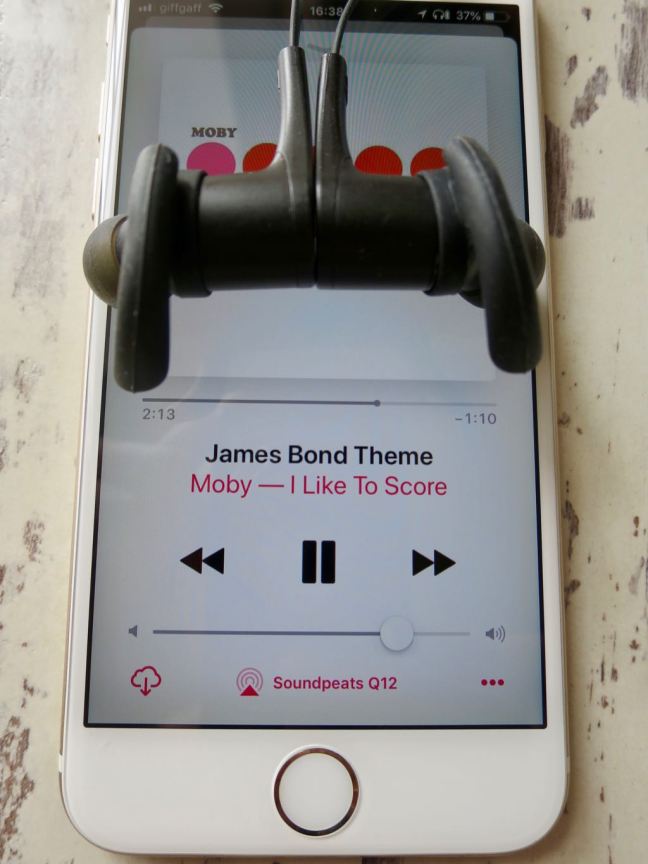
Soundpeats Q12 Headphones and Apple Music
Soundpeats Q12 Headphones green bluetooth earbuds
Soundpeats Q12 Headphones Box
Soundpeats Q12 Headphones Box Contents
Soundpeats Q12 Headphones Specs
Soundpeats Q12 Headphones
Soundpeats Q12 Headphones Earbuds
Soundpeats Q12 Headphones In line controls
Soundpeats Q12 Headphones Box
Soundpeats Q12 Headphones with apple watch

Manufacturer specs as follows :-

Different eartips and hooks fit everyone

Customized Ear Tips and In Ear-Hooks give anyone a strong and comfortable fit

Magnetic design make it simple to carry

You can feel nothing when you wear in on your neck when not use. And the built-in magnets can keep it on you neck

More faster, More stable

  • Bluetooth 4.1 technology enables quick transmission and smooth connection. CSR8645 Chipset with APTX codec enables headphones have high fidelity stereo and dynamic sound.
  • Read More....

    mental health 2313428 1920

    Social networks and their impacts on personal psychology & society

    I’ve been using social networks for many years. My original masters thesis revolved around the then emerging technologies of social networks. I coupled the ideas of early day twitter & Facebook & combined them with a virtual learning environment for universities.  Back then, I thought that social media, the semantic web & Web 2.0 as we called it, was the future.

    Through the years I’ve adopted more of these platforms and integrated them into my life. I’ve continued to study them from both a personal & a societal point of view, and in the last few years my view has shifted radically. Read More....

    Screenshot 2018 08 09 at 15.10.03

    Cory Doctrow sets out the future of the internet & ‘smart’ devices – recommended watch from Webstock 15

    I’ve been a huge fan of Cory Doctrow for a while now. With regular appearences on 2600’s Off The Hook radio show, not to mention his work for the EFF, he is well known in internet circles.

    This video is over an hour long, but goes a long way to explain the direction in which our technology (and the companies who run them) are going. If we leave it to the quasi-monopoly companies we have already, we are in for a rough ride. Recommended for any internet user, especially those with a penchant for smart home devices (he outlines some good real world hacks, including hacking a pacemaker). A great advocation for ignoring all of the apps & walled gardens & returning to the open internet. Read More....

    newspaper and coffee

    Ditch online news sites & step outside the outrage bubble

    For the last few months I’ve gone through a bit of a regression. As a born & bred internet nerd, I’ve always thought that online content was king. I’d pour over articles, blogs, forums & personal websites absorbing information. For the most part I still do enjoy all of those outlets, but one website genre has been sapping too much of my attention, News sites!

    During the run up to the 2016 EU referendum in the U.K and the presidential elections in the U.S my news consumption increased at an exponential rate. My drug of choice was The Guardian online. After all, I’m a liberal academic raised on the internet. I’m well versed in most sexualities, fetishes, niches & sub cultures. Growing up online not a lot slips under the radar. The guardian was a perfect fit for my political views, my environmental views and my social outlook. Growing up I was exposed to newspapers from across the political spectrum. From right-wing news like The Daily Mail & Telegraph, right through to The Guardian & The Observer. The general trend being, the younger adults in the family bought into the liberal press & the older members into the conservative press.

    As someone who used to dial onto the internet with a 14.4kbps dial up modem, I first experienced bulletin boards & forums. News wasn’t something that interested me until I hit my 30’s. Now I feel an obligation to be informed and at least somewhat politically literate. Like most people, my news started coming more from social media sites. Shared twitter articles & Facebook stories shaped my world view. The filter bubble had me.

    I realized early on that news consumed via social media was specifically targeted at me. If you follow people on social media who you relate to, chances are they will also hold the same views on politics and the environment. I would read stories about renewable energy & social issues. I would consume stories on tech & music culture. I was fed an endless supply of catered news stories, peacefully unaware of an alternate narrative running in parallel to my filter bubble.

    In late 2015 I started switching off all retweets and stopped using Facebook. I unfollowed all news outlets & would unfollow or mute users who got political or what I would consider ranty! I trimmed my social media so it was somewhat social again. I decided, if I wanted to read the news, I would do it consciously & head to news websites. This worked well for a period & then we entered the run up to the 2016 EU referendum. All of a sudden I could see the other side of the filter bubble. The mirror opposite of my bubble. People who instead of being angry about fossil fuels or the bedroom tax, where angry at immigration and that bizarre term ‘the metropolitan elite’.

    I knew early on that Leave would get a lot more votes than predicted in early polls & I could also see the click bait & outrage techniques they employed online. They used the same techniques as advertisers & influencers use to gain attention & cement a narrative. The remain campaign had no clue that the new battle would be fought (and won) online.

    The whole debate descended into outrageous claims & counter claims. It was like the worst parts of our tabloid press here in the U.K. but pumped up on steroids. Leave won the day, but our culture of discourse in the U.K. has been changed forever.

    This essay isn’t about that vote, it’s about the atmosphere created by that vote. News reporting changed. 24 hour news became a quagmire of live blogs, claim & counter-claim, ‘fake news’ and the most bizarre quotations. Since when did a tweet constitute a quote or news? It would seem that the need to break a story now trumps the need to investigate a story, fact check & produce a coherent article.

    What followed was the U.S. elections & a news industry which is whipped into such a frenzy it’s basically a live chatroom. Reporters frantically typing live blogs full of typos, users frantically responding in the comments section, only for stories to develop or be completely debunked hours later. Users are then arguing with each other & with journalists in the comments. This is not news or reporting in the traditional sense & it’s an assault on the synapses.

    Journalists are paid to investigate, digest information & present stories in a coherent manner. Fact checking should be done before publication. Retractions should be rare.

    This new kind of news reporting has made us all junior reporters. We interpret in real-time, often out of context & without all the facts & we form half-baked narratives. We also apply our own bias and then pass on our own biased versions of developing stories, essentially producing streams of fake news. Our opinions then hit social media where they develop in our filter bubbles & polarization increases between tribes. We’ve all had the flame wars with people of opposite political persuasions.

    I reached news burnout in mid 2017. I was feeling depressed & overwhelmed. I’d had countless arguments with family members & total strangers online. I was like an addict, constantly refreshing The Guardian front page waiting on an update. Something had to change.

    I went extreme at first. I added all of the news sites I could think of into a hosts file on my network. I essentially blocked all news at home. I went cold turkey for about a month, and whilst I felt less informed, I felt a sense of calm I hadn’t felt in at least 18 months. This was obvious denial & delusion, I knew I couldn’t hide from the news forever, but I could control how I consumed said news.

    After around 5 weeks I removed the blocks & all was well for a few days before I felt myself checking the sites again. I knew I had to change my habits so I decided to subscribe to two newspapers. I now read paper versions of The Guardian & The Times. I decided to balance my own arguments like any good academic by selecting more than one source. The guardian has an obvious liberal slant, while The Times is a conservative leading but very well written newspaper (in the UK it’s the only choice amongst the other right leaning news outlets, the rest are a bit crazy).

    I found by reading a newspaper, I was reading well written & well-edited stories. It also meant that I was selective over the stories I read & I was exposed to stories I would have otherwise missed. Reading real newspapers means that your data isn’t mined & your political leanings or preferences can’t be weaponized against you. There is something creepy about websites & third parties being able to keep track of all the stories you read & then using that data to target political messaging back at you. A major privacy benefit. Another added benefit is that when you reach the end, it goes in the recycling & you carry on with your day.

    By removing all of my news apps from my smartphone & tablet, as well as resisting the temptation to read live news websites I’ve actively slowed down my news consumption. I now feel informed, but not overwhelmed. Also, by balancing the views of two outlets I get a more rounded view & can more easily pick out the political bias in stories.

    24 hour news will always be frantic & a little haphazard. If a person only consumes this type of news, their anxiety levels will reflect the stream of information they are taking in. Most developing news is bad news or outrageous. We don’t get many good news stories on 24 hour outlets. Politicians can worry about the day-to-day running of the country & we can call them out as & when we can actually influence the debate. There is little value in getting irate on social media because a politician has tweeted something outrageous and we aren’t happy, all in real-time.

    So my advice to anyone feeling news burnout is to take it back to basics. News websites are in the business of holding your attention. The longer you stay, the more advertising space they can sell for your consumption. Slow down your consumption and read a newspaper. You can even opt to read a weekend newspaper which will have the most important news of the week & a few nice supplements for balance. Even a news magazine like The Week here in the U.K or the Weekend edition of the ‘I’ will give you a good overview of the stories you really need to know, but in a concise way.

    I wholeheartedly support journalists & real journalism. Unlike news blogs & websites, they still have a code of conduct to uphold & are unable to publish a story without scrutiny. Use blogs & personal websites for everything else, enjoy them, but for political news where there are real incentives to control the narrative or introduce bias, always at least have one trusted outlet. In the age of alleged foreign interference it’s a must.

    If you can’t afford to buy a newspaper, head to a cafe or coffee shop and read theirs. Most coffee shops have multiple copies of newspapers for customers & most would be happy for you to take a copy at the end of the day. You can even read the newspapers in most public libraries.

    Slow news, news that has already developed into a story saves you the personal processing time. You will feel less frazzled & more able to absorb stories, not to mention you will regain a lot of productive time & energy to be better utilized on your own projects.

    The 24 hour news cycle really got to me & live news & social news is going a long way to polarize our societies & divide opinion. With so much fake news & opinion masquerading as news, it can be an exhausting process just sifting through it.

    Buy a paper, grab a coffee & unplug from the outrage of online news & social media news sharing. Your brain will thank you for it.


    **If you really want to keep reading news online, you can take a few steps to improve your experience. I would say to set a time to check the news each day & stick to it. I would aim for say 9am, so you get the best edited stories from the previous day, but without any of the developing stories. Stick to that time & once finished, don’t check again until the next day. Try to avoid all live updating content such as live blogs. Live news is overload and by it’s very nature doesn’t have a natural end, so stick to reading fully formed articles. Don’t use news apps on your phone, always use the browser versions. It’s too easy just to launch an app. A few changes in your habits will make a huge difference. Finally, use an ad blocker with your web browser such as ublock origin and sign up to the mute blocklist. Even if you don’t block anything else with the adblocker, mute will block most comment fields across the web. Comments have become pretty unhelpful and will only fuel your outrage. If mute doesn’t catch a comment field, specify a custom filter using the ublock origin picker tool included with the browser extension.**


    sonos lock screen controls broken ios 11

    Sonos Lock Screen Controls Broken on ios after version 9.0 update

    As many readers will know, I opted to go down the Sonos route of home audio as opposed to the Apple Homepod route. While my devices are generally all within the Apple ecosystem, I don’t yet rate Siri & I do like the option to use third-party music streaming services such as Tidal if I see fit. I also like the Sonos app & the fact that I can control it from the app without having to use voice controls at all.

    One of the biggest features of Sonos that I use are the lock screen controls. My device usage has changed dramatically over recent months as I’ve been researching smart phone addiction & the problems caused by too much exposure to social media. One thing to come out of this research is that I tend to leave my iPhone docked in a bamboo dock in my kitchen at all times. This means I don’t pick up the phone at random & my compulsion to check it has diminished.

    This also means that I really rely on the lock screen controls for my sonos. The hardware volume buttons are perfect to quickly adjust volume without taking my phone out of the dock or even unlocking it. I use the lock screen skip buttons & I like to view the artwork on the lockscreen. Also, I use the lock screen controls via my apple watch, which makes perfect sense as the controls are always on hand. The apple watch is a great way to control sonos, it’s discrete and the digital crown acts as a volume knob.

    Sonos lock screen controls on Apple Watch
    Sonos lock screen controls on Apple Watch
    Sonos controls on my Series 3 apple watch
    Sonos controls on my Series 3 apple watch

    The other benefit is that the lock screen controls also appear on my wife’s iPhone & our iPad’s, meaning we normally have a device close at hand to control our sonos system.

    This week sonos rolled out Airplay 2 support. This support meant a sonos software update & an app update. To be clear, I have Sonos Play 1’s in my home. I don’t like having alexa in every room in the house & since unplugging the Fire Stick, I don’t have any smart device which is always listening for prompts. It just doesn’t fly with me from a privacy standpoint.

    The Play 1’s don’t support Airplay 2, the update only applies to the more high-end Sonos speakers such as the newer Play 5’s and the all new Sonos one’s with alexa built-in. I really wish that Airplay 2 could have been supported, but I may add a Sonos one to my system at some point which will enable it across my sonos system.

    Anyway, even though Airplay 2 isn’t supported on any of my devices, the new update broke my all important lock screen controls. After contacting Sonos I was told that basically the Lock Screen controls where never officially supported by Apple & that they had been a bit of a hack (playing a silent song on the iPhone to work).

    Regardless, the lock screen controls are what originally sold me into the Sonos ecosystem. I don’t like talking to my devices & it is too hit & miss at present. Furthermore most of my music is in my personal collection & my library isn’t fully supported by Alexa in the newer Sonos speakers.

    And the fix for Lock Screen Controls on iOS/Sonos

    After a lot of head scratching I decided to experiment with getting the lock screen controls working again. The option was still ticked in my iOS app settings, so I started poking around. I concluded that if AirPlay devices are available on the network, the lock screen controls are disabled as AirPlay takes precedent. I figured this out by unplugging my Apple TV and my Libreelec Kodi media centre on the Raspberry Pi. These two devices are my only Airplay endpoints on the network. After rebooting my iPhone and firing up the Sonos app, I was suprised to see the Lock Screen controls return.

    To make the change permanent, I disabled AirPlay on my Apple TV and I also disabled it on my Kodi media centre. For some reason, the iPhone running iOS 11 will now cache any AirPlay endpoints (possibly to allow them to sleep but still be available to iOS). So once you disable AirPlay, you need to restart all of your iOS devices. Also, unplug your AirPlay endpoints until you can confirm the fix works, and turn them back on one by one to isolate any which are still broadcasting as Airplay receivers.

    To find out which devices on your network are airplay endpoints, open the music app on your iOS devices (not the sonos app, but the actually music app) and click the airplay button. If you see any devices there, you need to identify them and disable airplay on those devices.

    My Lock Screen controls are now working as expected on all of my iOS devices & I hope Sonos can come up with a more elegant solution in future updates.

    I would love to introduce an AirPlay supporting speaker to my sonos collection which doesn’t feature Alexa, perhaps something for Sonos to consider for all of us Privacy focused tech people.

    Sonos lock screen controls Fixed on ios
    Sonos lock screen controls Fixed on ios 11