Soundpeats Air5 Pro Review: Affordable Hi-Res Earbuds With Adaptive ANC
Finding true wireless earbuds that balance hi-res sound, strong noise cancellation and comfort often means paying premium prices. Brands like Sony, Bose and Apple dominate the high-end, but Soundpeats has been building a reputation for delivering excellent value. Their latest release, the Air5 Pro, aims to offer flagship-style performance at a far more accessible cost. I was so eager to try these, I actually opened them & started using them straight away. Normally, I would take photos of earphones before using them, but I live by a loud road & it’s getting harder to hear my podcasts on my daily walks, so I was desperate to test out the noise-cancelling. I’ve not been disappointed. As usual for sound peats, they come well packaged & they feel premium. The charging case is great & I’ve only needed to recharge it once since getting the Air5 Pro’s.Read More....
I’ve had so many pairs of Soundpeats headphones & earphones over the years & they have possible the best quality to price ratio of any tech I use. The Q40HD are their updated sports earbuds and I just had to give them a go. I have an older pair of these I love when I go running. For me, these are ideal because they are wireless, but also a necklace type earphone. You can remove them from your ears and connect the earphones with their magnets to create a necklace, which keeps them in place when running by a busy road or when I need to hear. Much more convenient than a standard wireless earbud or headphones.Read More....
I’ve been rocking these SoundPeats PearlClip Pro earphones for a month or so now, so thought it was about time I did a short review of these little beauties. They are currently available on Amazon with money off, so I can 100% recommend grabbing a pair. Let’s dive into the review.
I’ve been looking for something to replace my wired apple earbuds for a while now. Since upgrading to an iPhone 16 Pro and requiring an adaptor to convert USB-C into a 3.5mm jack, I was thinking of grabbing a pair of wireless earbuds. The Apple AirPods are great, but for the amount they cost, I was convinced I could find a better option for my usage.Read More....
Long time readers of my website will know I’m a bit of a sucker for music & by extension any hardware or accessories which allow me to enjoy my music in a new way. I’ve been using my Beats Solo 3 for a while now but was contacted by OneOdio before Christmas to test their new A30 noise cancelling headphones.
A week later I had the OneOdio A30’s in my hand, and I was instantly impressed with this little gem. I wasn’t expecting great things given the sub £60 price tag, but I’ve got to say I’m blown away by how good these headphones are. My expectations were low due to price, but that was misplaced. They are wonderful.
They are on over ear design so the soft ear cups naturally block out a lot of ambient noise. Trigger the ANC switch though & you have 26db active noise cancelling which is brilliant. Like all noise cancelling, it is better at blocking out constant pitch of noise such as the hum of an engine, but these do well to block out most sounds, even sudden bangs and crashes in the environment.
Without the noise cancelling active, the sound response is decent from the 40mm drivers. Bass is punchy but not overpowering & treble doesn’t get muddy like it tends to on a lot of Bluetooth headphones. I’ve paired them with my MacBook, iMac, Apple Watch & iPhone, and they work flawlessly with each device, also allowing for easy switching between devices as they favour the current connected device which is outputting audio. Simply pause on one device and start playing on another and the audio source automatically switches. I have found that they work best without any EQ settings on iOS. I had a bass booster turned on for my earpods, but have switched it off for use with these. It was too bassy.
The multi function buttons on the side allow you to power on/off the headphones and also feature volume up and down buttons. Tap the power button to pause and resume and long press the volume buttons to skip tracks. The controls are always at hand, but I tend to use my Apple Watch to control my music, so not a function I use often.
One problem I did find was when pairing with my MacBook & iMac, the Bluetooth codec would default to SBC which is the basic Bluetooth reference codec & means audio will go out of sync with videos when playing. However, not stated on the box is that these headphones support the AAC codec which is the native apple codec on Mac/iOS devices. AAC is normally reserved for much higher end hardware & I’m surprised it isn’t advertised on the specs as it would make these even more desirable with apple users. Running the following commands in terminal on my iMac and MacBook enabled AAC support & audio/video streaming was in sync & the audio much better quality. I also enabled aptX for other headphones.
To enable AptX support
sudo defaults write bluetoothaudiod "Enable AptX codec" -bool true
The headphones charge using a USB C cable which is supplied & the OneOdio A30 headphones also come with carry case, wired cable for use when battery is low or on older non Bluetooth devices & an airline adaptor to allow you to use them on a plane.
The headphones are made out of plastic, which doesn’t feel premium like the alloys used in other brands, but they feel robust and hard wearing. The ear cups are a comfortable synthetic leather & I haven’t had any issues with hot ears or itching. The headband is padded in a similar vegan leather and one aspect I really like is that the top of the headband where the logo is, is also padded. I can’t tell you how many times I’ve banged my beats against things like car doors and not wanted to look at the scratches & gouges. A nice touch.
Battery life is excellent. Specs quote that you will get 15 hours using Bluetooth and noise cancelling, while you should get 25 hours with noise cancelling disabled & 45 hours of just noise cancelling without Bluetooth switched on. This all from a 500mAH battery. For my usage, listening to music, meditating & watching films while I work, I find that I’m charging them once a week. I don’t tend to use ANC when sat in the office, but will when meditating or walking outdoors & I’ve found it a really handy feature. It really does help. These headphones also have mics built in for hands-free calling which is a feature I’m using a lot during lockdown.
For under £60 on Amazon these are a no brainer. Great price, great product and wonderful value for money. As good if not better than headphones I’ve used at 5-6 times the price. Their support of AAC makes them perfect for iOS & Mac users & if you stream from Apple Music, you will notice that the audio is crisp and pleasant as intended. A highly recommended purchase.
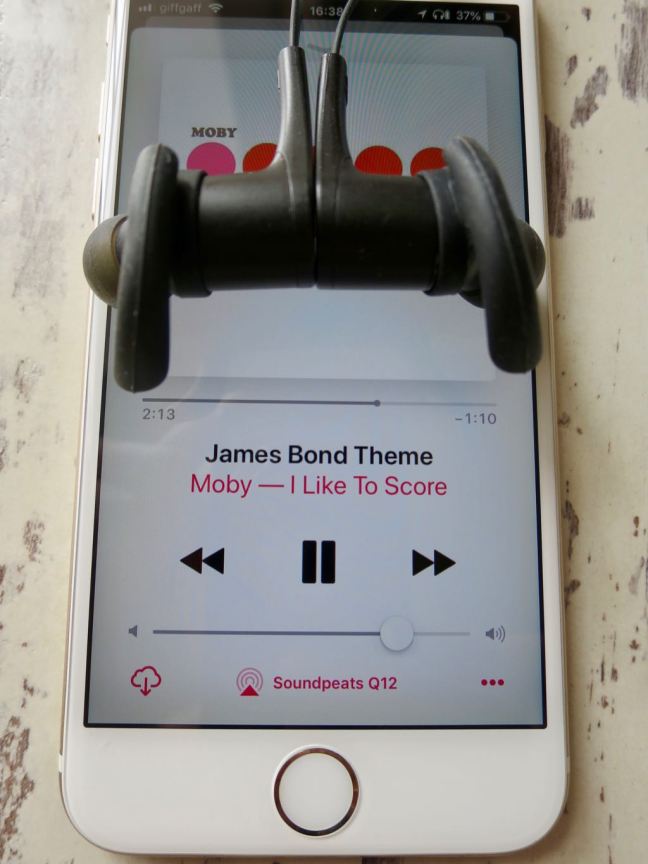
Over the last few weeks I’ve been trying out the new SoundPEATS Q12 bluetooth headphones. I already own a pair of the Q30 headphones which I use a lot with my Laptop and iphone. I wanted a more compact pair to grab on the go & use with my Apple Watch.
I’ve got a Nike+ Apple Watch Series 3 with Cellular and I tend to use my watch a lot to listen to music on the go. It means I can keep my iPhone in my pocket or backpack & not worry about being disturbed. It’s also amazing to use the apple watch to work out. I already use the fitness trackers on the apple watch, but now combined with the SoundPEATS Q12 headphones I can listen to music and track my workout.
The Soundpeats Q12 headphones are a similar design to my older Q30’s. They still have the magnets built-in so they connect like a necklace when not in your ears, and the left & right headphones are still connected by a wire which I really like. The one thing which has stopped me buying Earpods is the thought of having nowhere to put them when I stop to chat.
The wire connecting the left & right earbud on the Q12 is a better design than on the Q30. The cable is flat and much less prone to tangling. It also sits comfortably around my neck when not wearing the earbuds, and looks a little slicker too.
The Headphones come with various sizes of ear bud and ear hooks, so you can customise the fit to your ears. I’ve found a really snug fit with the large hooks and medium earbuds, almost to the point where they are noise cancelling like earplugs. Much of the outside world is blocked out by the close fit, meaning you can keep your volumes lower & protect your ears.
Another major benefit of the SoundPEATS Q12 is the ability to pair via bluetooth with two devices. I’ve got mine synced to my apple watch & to my iPhone, and can easily switch between the two without having to un-pair & re-pair the bluetooth connection.
The sound is very good from these earbuds. They take a little getting used to regarding fit, you figure out the right angle and depth to insert these earbuds & when you do the bass response is great & even at low volumes the sound fidelity is good. On a song such as Trains by Porcupine Tree, there is a good dynamic range, and I can hear good seperation in bass and treble between the hand claps and bass lines. For the price (currently only £19.99) these headphones are a great choice for people who appreciate decent sound without breaking the bank.
There are a selection of colourways for the Soundpeats Q12 headphones, but I opted for black with luminous green earbud inserts. They really suit my colour pallete.
In the pack you get three sizes of earbuds, three sizes of ear hooks and two cord clamps for hooking them to your T-shirt collar. The headphones come in a small faux leather pouch for storage and transport, and the pouch works great to keep them clean & dry in my backpack when not in use.
The headphones themselves weigh only 15g and are sweatproof so have survived my 40km daily bike rides with ease. I’ve also worn them in the rain & cold and have had no problems. The headphones are an advertised 8 hours battery life from the built-in lithium-ion battery, but I’ve found they will do around 10 hours between a charge on the volume setting I select.
The SoundPEATS Q12 also come with a 12 month warranty, so I’ve not been afraid to use them as advertised, and I work out in them for a few hours each day. I’ve never had issues with pairing on sync and they always performed as expected.
These Soundpeats Q12’s also support AptX And are specced as Bluetooth 4.1, so if you have an android phone or device supporting AptX, you will benefit from a better audio/bluetooth compression codec & the headphones should generally sound better.
I would never expect in ear headphones to perform as well as full size cans, but these work well with my ios devices & I’ve not noticed a difference between them using bluetooth & my wired apple earbuds. When playing on the iPhone I use Tidal Hifi and the sound is rich & defined.
If you want audiophile quality sound i would always advise you buy wired full size headphones with a built-in DAC, but for the casual daily user or someone who needs a lightweight & versatile pair of headphones, I would fully recommend the SoundPEATS Q12’s.
I’m currently using mine predominantly with my Apple Watch Series 3. The in line controls work perfectly with the apple watch for volume, play/pause & skipping of songs.
Soundpeats Q12 Headphones – package contentsSoundpeats Q12 Headphones EarbudsSoundpeats Q12 Headphones magnetsSoundpeats Q12 Headphones magnetsSoundpeats Q12 Headphones inline controlsSoundpeats Q12 Headphones and iPhoneSoundpeats Q12 Headphones Magnetised necklaceSoundpeats Q12 Headphones leather pouchSoundpeats Q12 Headphones green earbudsSoundpeats Q12 Headphones MicrophoneSoundpeats Q12 Headphones and Apple MusicSoundpeats Q12 Headphones green bluetooth earbudsSoundpeats Q12 Headphones BoxSoundpeats Q12 Headphones Box ContentsSoundpeats Q12 Headphones SpecsSoundpeats Q12 HeadphonesSoundpeats Q12 Headphones EarbudsSoundpeats Q12 Headphones In line controlsSoundpeats Q12 Headphones BoxSoundpeats Q12 Headphones with apple watch
Manufacturer specs as follows :-
Different eartips and hooks fit everyone
Customized Ear Tips and In Ear-Hooks give anyone a strong and comfortable fit
Magnetic design make it simple to carry
You can feel nothing when you wear in on your neck when not use. And the built-in magnets can keep it on you neck
More faster, More stable
Bluetooth 4.1 technology enables quick transmission and smooth connection. CSR8645 Chipset with APTX codec enables headphones have high fidelity stereo and dynamic sound.
As many readers will know, I opted to go down the Sonos route of home audio as opposed to the Apple Homepod route. While my devices are generally all within the Apple ecosystem, I don’t yet rate Siri & I do like the option to use third-party music streaming services such as Tidal if I see fit. I also like the Sonos app & the fact that I can control it from the app without having to use voice controls at all.
One of the biggest features of Sonos that I use are the lock screen controls. My device usage has changed dramatically over recent months as I’ve been researching smart phone addiction & the problems caused by too much exposure to social media. One thing to come out of this research is that I tend to leave my iPhone docked in a bamboo dock in my kitchen at all times. This means I don’t pick up the phone at random & my compulsion to check it has diminished.
This also means that I really rely on the lock screen controls for my sonos. The hardware volume buttons are perfect to quickly adjust volume without taking my phone out of the dock or even unlocking it. I use the lock screen skip buttons & I like to view the artwork on the lockscreen. Also, I use the lock screen controls via my apple watch, which makes perfect sense as the controls are always on hand. The apple watch is a great way to control sonos, it’s discrete and the digital crown acts as a volume knob.
Sonos lock screen controls on Apple WatchSonos controls on my Series 3 apple watch
The other benefit is that the lock screen controls also appear on my wife’s iPhone & our iPad’s, meaning we normally have a device close at hand to control our sonos system.
This week sonos rolled out Airplay 2 support. This support meant a sonos software update & an app update. To be clear, I have Sonos Play 1’s in my home. I don’t like having alexa in every room in the house & since unplugging the Fire Stick, I don’t have any smart device which is always listening for prompts. It just doesn’t fly with me from a privacy standpoint.
The Play 1’s don’t support Airplay 2, the update only applies to the more high-end Sonos speakers such as the newer Play 5’s and the all new Sonos one’s with alexa built-in. I really wish that Airplay 2 could have been supported, but I may add a Sonos one to my system at some point which will enable it across my sonos system.
Anyway, even though Airplay 2 isn’t supported on any of my devices, the new update broke my all important lock screen controls. After contacting Sonos I was told that basically the Lock Screen controls where never officially supported by Apple & that they had been a bit of a hack (playing a silent song on the iPhone to work).
Regardless, the lock screen controls are what originally sold me into the Sonos ecosystem. I don’t like talking to my devices & it is too hit & miss at present. Furthermore most of my music is in my personal collection & my library isn’t fully supported by Alexa in the newer Sonos speakers.
And the fix for Lock Screen Controls on iOS/Sonos
After a lot of head scratching I decided to experiment with getting the lock screen controls working again. The option was still ticked in my iOS app settings, so I started poking around. I concluded that if AirPlay devices are available on the network, the lock screen controls are disabled as AirPlay takes precedent. I figured this out by unplugging my Apple TV and my Libreelec Kodi media centre on the Raspberry Pi. These two devices are my only Airplay endpoints on the network. After rebooting my iPhone and firing up the Sonos app, I was suprised to see the Lock Screen controls return.
To make the change permanent, I disabled AirPlay on my Apple TV and I also disabled it on my Kodi media centre. For some reason, the iPhone running iOS 11 will now cache any AirPlay endpoints (possibly to allow them to sleep but still be available to iOS). So once you disable AirPlay, you need to restart all of your iOS devices. Also, unplug your AirPlay endpoints until you can confirm the fix works, and turn them back on one by one to isolate any which are still broadcasting as Airplay receivers.
To find out which devices on your network are airplay endpoints, open the music app on your iOS devices (not the sonos app, but the actually music app) and click the airplay button. If you see any devices there, you need to identify them and disable airplay on those devices.
My Lock Screen controls are now working as expected on all of my iOS devices & I hope Sonos can come up with a more elegant solution in future updates.
I would love to introduce an AirPlay supporting speaker to my sonos collection which doesn’t feature Alexa, perhaps something for Sonos to consider for all of us Privacy focused tech people.
Before I get into this, let me just say that this is my own opinion, based on music that I like & using the kit that I currently own. I’m by no means an audiophile & I don’t pour thousands of pounds into my home hi-fi kit. I’ve been trying to find the best combination of streaming & local storage of AAC to suit my needs & these are my findings.
Over the last few months, I’ve been trying out Apple Music, Spotify Premium, Amazon Music Unlimited & Tidal. I also have my own music collection which is ripped to iTunes. My own collection is around 26,000 tracks, ripped from CD in Apples 256kbps AAC codec format using iTunes. I combine this with iTunes match both to backup my collection on apples’ servers in case of a disk failure & also to give me access to my music on my Apple & iOS devices. For years this has served me well & is a habit I will keep, but I was definitely interested in new music discovery so ventured into the world of streaming services.
I’m not going to write much about Spotify, Amazon or Apple Music. After trying all three I’ve got to say I found Spotify the best for music discovery but Apple Music the best for sound quality & overall experience. Bear in mind that I use iMacs, MacBooks, iPhones & iPads so I’m heavily into the Apple Ecosystem already.
I did find however that Apple Music offered no significant benefits over my locally stored AAC, so I cancelled that subscription & went back to sourcing & curating my own library.
On the whole, I’ve been very happy with 256kbps AAC. I mostly listen to music using my iMac and Creative Inspire 2.1 2400 speakers with bass sub (these powered speakers with sub are ancient & connect via a 3.5mm jack).
Creative Inspire 2400 2.1 Speakers
These speakers are pretty old now but they’ve always sounded great & as an average consumer I’ve never felt the need to upgrade them. I’m sure many people reading this will have fancy monitor speakers & separate DAC’s, but this is aimed more at the home user so you could probably skip the rest.
Last week I decided to give Tidal a go on their free trial. I’ve always played with the idea of Tidal, but with only a one month trial & a £20 a month price tag I’d always dismissed the service. I don’t personally know anyone else who has a Tidal account so it’s just not been on my Radar. After visiting Bang & Olufsen in Truro and hearing the most amazing sound, only to notice the owner was running tidal off his own iMac for that sound, I just had to give it a go.
What can I say, I’m blown away by Tidal. I signed up for the Hi-Fi account which offers 320kbps AAC, but also all tracks are available as lossless quality FLAC files. The FLAC streams sound incredible, even on my modest setup. I can hear aspects of favourite songs I’ve never heard, such as plectrum scratches in Steven Wilson tracks & high-frequency percussion in Porcupine Tree tracks.
I can hear a lot more high-frequency sounds, and vocals sound much crisper and cleaner. When compared to my AAC the sound is a lot more clear & less muddy. In comparison to my 256kbps AAC, it’s like listening to normal audio and listening with a towel over the speaker.
I’ve got a few albums in FLAC, but storage of my entire collection has never appealed to me due to the time it would take to manage the files & the various backups I’d have to keep. I’m now keeping my music collection in AAC for personal use & use on the go, but predominantly listening to tracks on Tidal if they are available.
Then we come onto the Tidal Masters. I could probably get even more out of them with better monitor speakers & an external DAC plugged into the mac, but as an average consumer listener, I’d rather hear the best I can with the kit I’ve already got. Masters do sound wonderful even on my kit, and although the MQA streams will be software decoded & downsampled slightly for my sound card in the iMac, there is no doubt the audio quality is sublime.
I’ve had no issues with buffering of the streams & I even love the Tidal interface, especially the spinning disc effect on full-screen mode.
Tidal Desktop Spinning Disc GUI
I’ve got no problems at all with my personal collection staying in 256kbps AAC. The Matched tracks on iTunes match are deleted from my machine & re-downloaded so I have Apple’s own iTunes store copies/rips of the tracks. I’m not prepared at this point in my life to spend thousands on pro audio gear or a listening room. I just like to get the best out of the stuff I have & mixing my own collection in 256kbps AAC with a Tidal subscription seems to be a great compromise.
At £20 a month it is quite expensive, but well worth it if you listen to more than a few hours of music every month. I’m really enjoying the Tidal experience & the extra boost in sound quality seems to be worth it. I can cancel at any time & fall back on my own vast collection, but I’ll play it by ear month on month.
Tidal Desktop User Interface on Apple iMac
Tidal also sounds great played in hi-fi on my iOS devices, even when outputting to Bluetooth speakers, there is a definite improvement over my AAC tracks.
In the living room, we have a stereo pair of Sonos Play 1’s. We live in close proximity to neighbours & have a modestly sized living room as I expect most of my readers will, and the Play One’s in stereo are more than sufficient in terms of both sound quality & power output. I’ve added My local music library to the Sonos system & I’ve now added Tidal as a music service. Tidal works really well with Sonos & again it’s a definite sound upgrade from my AAC. Sonos will only support the Hi-Fi FLAC streams at the moment, but these are of CD quality on the whole so it’s a clean and crisp sound.
The Tidal App for iOS also supports Sonos as an output device so you can use the Tidal App and output your audio to your Sonos system. This is great for music discovery or to resume your listening when you come from outside listening on Headphones or in the car.
When using earbuds on my iPhone 6 with Tidal, the improvements are more subtle. Tidal tends to have a little less bass than Apple AAC files, but the sound on Tidal tends to be more rounded & a slightly nicer experience. When listening to my Sony headphones, there is definitely an improvement over AAC.
All of my kit is pretty standard and consumer level. It’s by no means audiophile quality, but most people I know are not that interested in investing thousands to listen to their music. I have a few Audiophile friends who have spent upwards of £20k on kit, and while it sounds wonderful, it’s a little bit of a diminishing return for the size of the improvement.
For now, I’ll enjoy all of my favourite tracks on Tidal and keep my own curated library in AAC to supplement and archive my music. It’s not a great deal to pay out each month & the quality improvement is of tangible value. 256kbps AAC to FLAC is a big jump in quality. Anything above that on consumer kit just seems like overkill for the size of the improvement you would see.
If you decide to give Tidal a go on a Mac, make sure to adjust your streaming settings to max out at Master, and also give Tidal exclusive use of the built-in audio device. This way Tidal will adjust your soundcards sample rates to take advantage of the improved audio streams. This really helped Masters to sound better on my machine (yes I know so downsampling will occur as my sound card can’t support that maximum sampling rate) But it does seem to max out my sound cards abilities & sound as good as it can on my current kit.
Tidal Masters MAC – Settings for best audio on an iMacTidal Masters Mac – Built-In Output for the best quality
I know I’ll get a million audiophiles telling me I’m doing it wrong, but after reading all of the reviews & What Hi-Fi magazine I was still struggling to figure out what would sound good on my relatively primitive & low-end setup. I expect most people will want to maximize what they have rather than invest heavily in a lot of extra audio gear. If that is the case, I suggest you give Tidal a go on their free trial. It has definitely changed my music listening & I’m even seeking out awesome sounding albums like Led Zeppelin & Talk Talk.
I’ve been looking for a pair of Bluetooth earphones for a while now. I wanted a pair with a short wire attaching the two buds as I often take them out to stop and chat with people when walking around the city. With my wired apple earbuds, I normally run them up under my T-shirt and out at the collar so I can take them out and let them hang from my neck.
This single requirement has put me off Bluetooth and wireless headphones for a while until I came across the Soundpeats Q30 wireless earphones.
A few months ago I took a gamble on the Soundpeats P4 Bluetooth speaker. I’d been looking for one for ages and decided to give the really well priced Soundpeats P4 a go. I took the P4 on holiday and loved it, using it every day. I’ve used it every day since being home for the last few months so I can say the quality is outstanding.
I, therefore, decided to check out what Sound Peats had to offer in the Bluetooth headphone department. A few of their products are the individual earbuds, which as I mentioned aren’t suited to my lifestyle. But then I came across the Soundpeats Q30 Bluetooth headphones. The buds are joined by a wire which runs around the back of your neck. The wire also includes a mic and volume/playback controls as you would find on Apple Earbuds. The real party piece comes from the design of the Q30 though. A magnet has been included on the rear of each earbud, so when you hang them around your neck to chat with friends, they click together and form a necklace so you don’t lose them. I personally thought this was genius from Soundpeats.
They are very reasonably priced offering at £19.98 on Amazon and are currently half price so if you like the review you should be quick & grab a pair while they are on offer.
Now, to the headphones themselves. They are really well made and have a light alloy body on the ear buds. These things feel really tough. They are supplied with a range of in earbuds which are interchangeable and of varying sizes, so you can select the size which fits your ear most comfortably. I went for the biggest size so I get an almost vacuum seal fit. This, I find, blocks out most external noise and allows me to listen to music at a much lower volume and hear every note as you aren’t blocking out the environmental noises.
The fact that the earbuds are themselves joined by a wire means you don’t have any sync issues between left & right and you only need to worry about a single pairing, no chance of one ear losing signal like reports from much more expensive headphones.
In the box, you also get an assortment of ear grips, which grip onto the inner part of your ear to keep them extra secure & finally you get a charging cable, all in a neat little leather effect travel bag.
Due to the vacuum design of the earphones, the Soundpeats Q30 earphones offer a lot of clarity and bass, even at low volumes. You need to make sure the buds are positioned correctly in your ear for best results, but after a few times using them, this becomes second nature. The sound is rich and as good as a lot of much more expensive Bluetooth earphones I’ve tried out.
Having the controls on the joining wire is also brilliant. They fall pretty much in the same place as I’ve come to know from my apple earphones and the controls are exactly the same, even down to a small microphone for taking calls or talking to Siri. The volume controls and play/pause buttons are another must for me.
I haven’t had any issues with these headphones regarding pairing with Bluetooth with my iPhone 6 or my MacBook. My iPhone remembers them and instantly connects when I turn them on. I would advise you read the instructions regarding the multi-function buttons before you start. A long press of the play button is also the on/off button and as these are powered by a battery, which you charge with the supplied cable, you will want to turn them off when not using them.
I can only say good things about these Soundpeats Q30 headphones. They are comfortable, dependable and the battery life is very good. I’ve only charged them on a couple of occasions and the iPhone gives me an indication of battery life via Bluetooth in the status bar. They seem to last much longer than the 8 hours quoted on the box but I expect this will vary depending on how you use them.
Wearing them is a pleasure, they grip the ear very well and feel secure. I’ve used mine daily for all of my days around the city and they haven’t yet fallen out, even when running in the rain. The added benefit being if one falls out they are still connected around your neck & you can use the included line clamp to attach to your T-shirt collar if you need extra security.
If you are in the market for a pair of Bluetooth headphones I would fully recommend the Soundpeats Q30 earbuds. They are comfortable, sturdy, has great sound quality and features & at less than £20 they represent huge value for money.
The technical specs are very good for these Soundpeats Q30 headphones, you can check them out below:-
=&0=&
Bluetooth Version: V4.1
Charging Time: 2 hours
Play Time: 7 Hours
Talk Time: Up to 8 hours
Bluetooth Mode: HFP/HSP/A2DP/AVRCP
Weight:0.53OZ/15g
=&1=&
1 x Q30 Sports Magnetic Bluetooth Headset Wireless Earphone
1 x Line Clamp
1 x USB Charging Cable
5 x Pairs of Ear Tips (XS/S/M/L/XL)
3 x Pairs of Ear Fins(S/M/L/)
3 x Slide Line Buckle
1 x Leather Bag
1 x User manual
Soundpeats Q30 EarbudsSoundpeats Q30 Manuals and carry pouchSoundpeats Q30 bluetooth headphones and boxSoundpeats Q30 bluetooth earphones boxSoundpeats Q30 Bluetooth EarbudsSoundpeats Q30 Bluetooth EarbudsSoundpeats Q30 Bluetooth EarbudsSoundpeats Q30 inline controlsSoundpeats Q30 Accessory PackSoundpeats Q30 Wireless Earphones & BoxSoundpeats Q30 earbudsSoundpeats Q30 Bluetooth earphones and box