I’ve had so many pairs of Soundpeats headphones & earphones over the years & they have possible the best quality to price ratio of any tech I use. The Q40HD are their updated sports earbuds and I just had to give them a go. I have an older pair of these I love when I go running. For me, these are ideal because they are wireless, but also a necklace type earphone. You can remove them from your ears and connect the earphones with their magnets to create a necklace, which keeps them in place when running by a busy road or when I need to hear. Much more convenient than a standard wireless earbud or headphones.Read More....
I’ve been rocking these SoundPeats PearlClip Pro earphones for a month or so now, so thought it was about time I did a short review of these little beauties. They are currently available on Amazon with money off, so I can 100% recommend grabbing a pair. Let’s dive into the review.
I’ve been looking for something to replace my wired apple earbuds for a while now. Since upgrading to an iPhone 16 Pro and requiring an adaptor to convert USB-C into a 3.5mm jack, I was thinking of grabbing a pair of wireless earbuds. The Apple AirPods are great, but for the amount they cost, I was convinced I could find a better option for my usage.Read More....
I’ve had an issue since upgrading to Sonoma on my 2019 Intel iMac. I have power nap disabled, as every time the computer wakes under power nap, my external drives spin up. My office at home is in the next room to our bedroom, so I hear the drives spinning up & down all night. It has been driving me mad. I’m not a big fan of the new energy saver settings in Sonoma, or the entire settings layout for that matter. When looking in logs using the following in terminal:-Read More....
Long time readers of my website will know I’m a bit of a sucker for music & by extension any hardware or accessories which allow me to enjoy my music in a new way. I’ve been using my Beats Solo 3 for a while now but was contacted by OneOdio before Christmas to test their new A30 noise cancelling headphones.
A week later I had the OneOdio A30’s in my hand, and I was instantly impressed with this little gem. I wasn’t expecting great things given the sub £60 price tag, but I’ve got to say I’m blown away by how good these headphones are. My expectations were low due to price, but that was misplaced. They are wonderful.
They are on over ear design so the soft ear cups naturally block out a lot of ambient noise. Trigger the ANC switch though & you have 26db active noise cancelling which is brilliant. Like all noise cancelling, it is better at blocking out constant pitch of noise such as the hum of an engine, but these do well to block out most sounds, even sudden bangs and crashes in the environment.
Without the noise cancelling active, the sound response is decent from the 40mm drivers. Bass is punchy but not overpowering & treble doesn’t get muddy like it tends to on a lot of Bluetooth headphones. I’ve paired them with my MacBook, iMac, Apple Watch & iPhone, and they work flawlessly with each device, also allowing for easy switching between devices as they favour the current connected device which is outputting audio. Simply pause on one device and start playing on another and the audio source automatically switches. I have found that they work best without any EQ settings on iOS. I had a bass booster turned on for my earpods, but have switched it off for use with these. It was too bassy.
The multi function buttons on the side allow you to power on/off the headphones and also feature volume up and down buttons. Tap the power button to pause and resume and long press the volume buttons to skip tracks. The controls are always at hand, but I tend to use my Apple Watch to control my music, so not a function I use often.
One problem I did find was when pairing with my MacBook & iMac, the Bluetooth codec would default to SBC which is the basic Bluetooth reference codec & means audio will go out of sync with videos when playing. However, not stated on the box is that these headphones support the AAC codec which is the native apple codec on Mac/iOS devices. AAC is normally reserved for much higher end hardware & I’m surprised it isn’t advertised on the specs as it would make these even more desirable with apple users. Running the following commands in terminal on my iMac and MacBook enabled AAC support & audio/video streaming was in sync & the audio much better quality. I also enabled aptX for other headphones.
To enable AptX support
sudo defaults write bluetoothaudiod "Enable AptX codec" -bool true
The headphones charge using a USB C cable which is supplied & the OneOdio A30 headphones also come with carry case, wired cable for use when battery is low or on older non Bluetooth devices & an airline adaptor to allow you to use them on a plane.
The headphones are made out of plastic, which doesn’t feel premium like the alloys used in other brands, but they feel robust and hard wearing. The ear cups are a comfortable synthetic leather & I haven’t had any issues with hot ears or itching. The headband is padded in a similar vegan leather and one aspect I really like is that the top of the headband where the logo is, is also padded. I can’t tell you how many times I’ve banged my beats against things like car doors and not wanted to look at the scratches & gouges. A nice touch.
Battery life is excellent. Specs quote that you will get 15 hours using Bluetooth and noise cancelling, while you should get 25 hours with noise cancelling disabled & 45 hours of just noise cancelling without Bluetooth switched on. This all from a 500mAH battery. For my usage, listening to music, meditating & watching films while I work, I find that I’m charging them once a week. I don’t tend to use ANC when sat in the office, but will when meditating or walking outdoors & I’ve found it a really handy feature. It really does help. These headphones also have mics built in for hands-free calling which is a feature I’m using a lot during lockdown.
For under £60 on Amazon these are a no brainer. Great price, great product and wonderful value for money. As good if not better than headphones I’ve used at 5-6 times the price. Their support of AAC makes them perfect for iOS & Mac users & if you stream from Apple Music, you will notice that the audio is crisp and pleasant as intended. A highly recommended purchase.
I held off upgrading to Catalina for a long time. I was hanging onto a few 32bit only apps and also I’ve experienced trouble in the past with new OS iterations. As we have reached 10.15.5 I decided to take the plunge and upgrade. We are running a few Macs in the house. Both MacBooks support Catalina natively, but my iMac is a 2009 model and as such is technically unsupported. I’ve been upgrading my 2009 iMac for a few years using the DosDude patch and it has always worked perfectly. The upgrade of the MacBooks went great, and even the iMac seemed to be coping well.Read More....
I first got hold of this Raspberry Pi 1 Model B back in May 2012. At the time, I bought the pi to replace an ageing Apple TV 2 which I had jail broken and was using as a kodi media centre. It worked well, but I preferred the Aluminium apple remote & IR sensor on the ATV2 so the pi was largely mothballed.
A few years later I bought a Raspberry Pi 2 Model B and this became our main Kodi media centre, replacing the Apple TV 2 and coupled with a Rii keyboard. It was much faster & more stable running Libreelec.
A couple more years passed and I realized I still had my first Pi, complete with an awesome perspex case, so I had a look for projects to complete with it. I stumbled across the PiHole project and the rest is history.
PiHole is a network ad blocker/filter and DNS server. It has a great browser interface & you can add lots of adblock/ublock blocklists to the pi, to block ads on all devices on the network at a hardware level. Unlike adblockers on a browser which use more cosmetic ways of blocking ads, the pihole blocks them at DNS level, meaning a request to the ad/blocked server never leaves the network. From a privacy standpoint this is huge. It also means I can control traffic/trackers on devices such as our Smart TV and iOS devices. It’s surprising how many requests these devices make without your knowledge.
Pi Hole Web Interface
PiHole’s web interface shows all traffic & destinations and allows you to whitelist or blacklist IP’s & domains for fine-grained control over outgoing traffic on your network.
I took my setup one step further & coupled it with DNSCrypt 2.0 to encrypt all of my outbound DNS traffic. DNSCrypt coupled with PiHole on the pi & HTTPS everywhere in my browser ensures no unencrypted traffic leaves my browser. All DNS lookups are encrypted & I use non logging DNSCrypt Servers for my DNS lookups. This adds an extra layer of protection for my network traffic & prevents eavesdropping & sniffing of my traffic.
The Pi Hole raspberry pi sits in a cupboard downstairs and filters all of our network traffic. We have around 20 Wi-Fi connected devices on the network & around 10 hard-wired devices & it copes fine. It’s running 24/7 and the blocklist contains almost 1.3 million blocked domains without a hitch. Even with DNScrypt running alongside Pi Hole (which are both Python based) and a MySQL server for Kodi, the old Pi with its modest hardware isn’t stressed, runs silently, uses very little CPU time and has a 50% memory footprint. It’s even running the original SD card which has been in use since 2012.
This is a great solution. It’s silent, uses only a few watts of power & saves thousands of extra requests per day, not to mention the amount of data which is never downloaded. Browsing is generally much quicker on my home network & an added benefit is that we don’t see advertising on catch up TV services on our Smart TV.
I’m going to do a full post on setting up the pi for this usage, so if you would like to see that, check back soon.
For those of you willing to dive in, you need a Pi running raspbian. You can install Pi Hole using the instructions on their website
Over the last few days I’ve had a massive increase in traffic from Chinese data centres & ISPs. The traffic has been relentless & the CPU usage on my server kept spiking enough to cause a fault in my cPanel hosting. I’m on a great hosting package with UKHOST4U and the server is fast & stable, but it is shared with a few other websites. This means that I couldn’t just blanket ban Chinese IP ranges. Even though we don’t sell our products in China, it seemed like a very heavy-handed approach, and to block via .htaccess with the entire range of Chinese IP addresses was causing a 2-3 second delay in page parsing (pages normally load in around 600ms).Read More....
Since updating to iOS 12 on my iPhone 6 I’ve had a major headache. Album art hasn’t been working for my iTunes match (iCloud) music library, and I’ve only been seeing the standard iTunes missing artwork icon for my songs & albums.
I even re-subscribed to Apple Music to see if the problem was iTunes match only, but it also affected most of the music I streamed from Apple Music too.
I’ve managed to find a really simple fix for the album artwork problem.
Head over into settings and click on the music tab. Once there, you need to disable iCloud music & Apple Music by clicking the toggles. Immediately after disabling iTunes Match (iCloud Music) and Apple music, you need to restart your iOS device. Do this as soon as you disable the toggles, that way you will stop iOS pruning off corrupted artwork files.
Once restarted, you can re-enable both the iCloud Music and Apple Music toggles in settings. At this point, it may ask if you want to delete music stored on your device & replace it with that in iCloud. Click yes at this point to force iOS to do a hard reset of the music XML file and cached thumbnails on the device. In this way iOS will delete all previous traces of the corrupted music database file and thumbnails.
When you open music, you should see the Apple Music app slowly start to cache your library & thumbnails again.
This took me a few days to fully rectify but going through the above steps seems to be the only way to force a hard reset of the apple music and icloud music cache.
Fix Note 2 – I also found that only having 1.5GB of free space on my iphone meant that ios wasn’t caching all artwork. By freeing up space, offloading unused apps to icloud & deleting my locally stored podcasts, I’ve managed to get all artwork to show without issue. Make sure you free up any additional space possible, more than 1.5GB seems to be the sweet spot for this fix to work. It would appear ios is reserving that last GB or so for something, so is failing to cache artwork.
Hope this helps to fix your broken album artwork in iOS 12.
Toggle off and restart to fix album art in ios 12iOS 12 album artwork missing
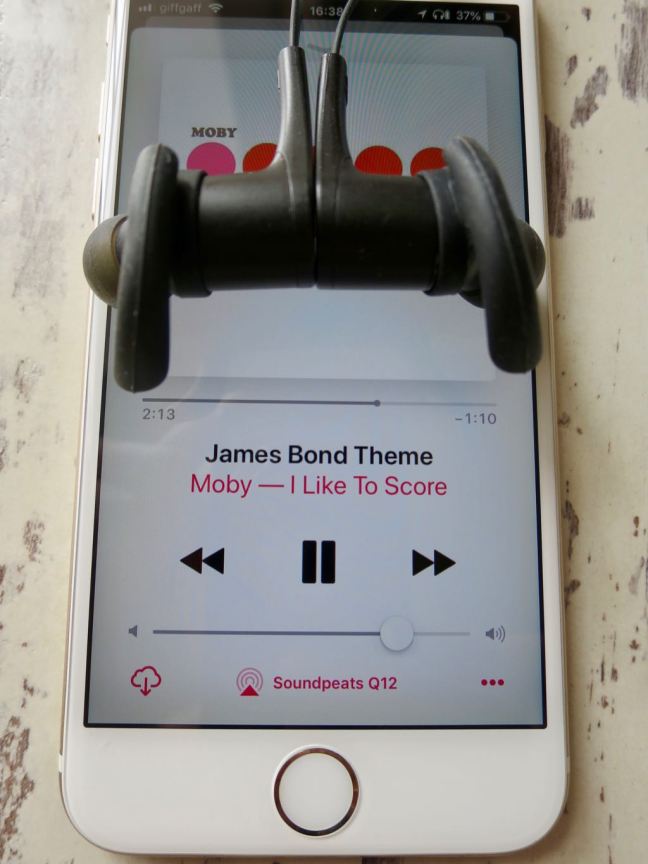
Over the last few weeks I’ve been trying out the new SoundPEATS Q12 bluetooth headphones. I already own a pair of the Q30 headphones which I use a lot with my Laptop and iphone. I wanted a more compact pair to grab on the go & use with my Apple Watch.
I’ve got a Nike+ Apple Watch Series 3 with Cellular and I tend to use my watch a lot to listen to music on the go. It means I can keep my iPhone in my pocket or backpack & not worry about being disturbed. It’s also amazing to use the apple watch to work out. I already use the fitness trackers on the apple watch, but now combined with the SoundPEATS Q12 headphones I can listen to music and track my workout.
The Soundpeats Q12 headphones are a similar design to my older Q30’s. They still have the magnets built-in so they connect like a necklace when not in your ears, and the left & right headphones are still connected by a wire which I really like. The one thing which has stopped me buying Earpods is the thought of having nowhere to put them when I stop to chat.
The wire connecting the left & right earbud on the Q12 is a better design than on the Q30. The cable is flat and much less prone to tangling. It also sits comfortably around my neck when not wearing the earbuds, and looks a little slicker too.
The Headphones come with various sizes of ear bud and ear hooks, so you can customise the fit to your ears. I’ve found a really snug fit with the large hooks and medium earbuds, almost to the point where they are noise cancelling like earplugs. Much of the outside world is blocked out by the close fit, meaning you can keep your volumes lower & protect your ears.
Another major benefit of the SoundPEATS Q12 is the ability to pair via bluetooth with two devices. I’ve got mine synced to my apple watch & to my iPhone, and can easily switch between the two without having to un-pair & re-pair the bluetooth connection.
The sound is very good from these earbuds. They take a little getting used to regarding fit, you figure out the right angle and depth to insert these earbuds & when you do the bass response is great & even at low volumes the sound fidelity is good. On a song such as Trains by Porcupine Tree, there is a good dynamic range, and I can hear good seperation in bass and treble between the hand claps and bass lines. For the price (currently only £19.99) these headphones are a great choice for people who appreciate decent sound without breaking the bank.
There are a selection of colourways for the Soundpeats Q12 headphones, but I opted for black with luminous green earbud inserts. They really suit my colour pallete.
In the pack you get three sizes of earbuds, three sizes of ear hooks and two cord clamps for hooking them to your T-shirt collar. The headphones come in a small faux leather pouch for storage and transport, and the pouch works great to keep them clean & dry in my backpack when not in use.
The headphones themselves weigh only 15g and are sweatproof so have survived my 40km daily bike rides with ease. I’ve also worn them in the rain & cold and have had no problems. The headphones are an advertised 8 hours battery life from the built-in lithium-ion battery, but I’ve found they will do around 10 hours between a charge on the volume setting I select.
The SoundPEATS Q12 also come with a 12 month warranty, so I’ve not been afraid to use them as advertised, and I work out in them for a few hours each day. I’ve never had issues with pairing on sync and they always performed as expected.
These Soundpeats Q12’s also support AptX And are specced as Bluetooth 4.1, so if you have an android phone or device supporting AptX, you will benefit from a better audio/bluetooth compression codec & the headphones should generally sound better.
I would never expect in ear headphones to perform as well as full size cans, but these work well with my ios devices & I’ve not noticed a difference between them using bluetooth & my wired apple earbuds. When playing on the iPhone I use Tidal Hifi and the sound is rich & defined.
If you want audiophile quality sound i would always advise you buy wired full size headphones with a built-in DAC, but for the casual daily user or someone who needs a lightweight & versatile pair of headphones, I would fully recommend the SoundPEATS Q12’s.
I’m currently using mine predominantly with my Apple Watch Series 3. The in line controls work perfectly with the apple watch for volume, play/pause & skipping of songs.
Soundpeats Q12 Headphones – package contentsSoundpeats Q12 Headphones EarbudsSoundpeats Q12 Headphones magnetsSoundpeats Q12 Headphones magnetsSoundpeats Q12 Headphones inline controlsSoundpeats Q12 Headphones and iPhoneSoundpeats Q12 Headphones Magnetised necklaceSoundpeats Q12 Headphones leather pouchSoundpeats Q12 Headphones green earbudsSoundpeats Q12 Headphones MicrophoneSoundpeats Q12 Headphones and Apple MusicSoundpeats Q12 Headphones green bluetooth earbudsSoundpeats Q12 Headphones BoxSoundpeats Q12 Headphones Box ContentsSoundpeats Q12 Headphones SpecsSoundpeats Q12 HeadphonesSoundpeats Q12 Headphones EarbudsSoundpeats Q12 Headphones In line controlsSoundpeats Q12 Headphones BoxSoundpeats Q12 Headphones with apple watch
Manufacturer specs as follows :-
Different eartips and hooks fit everyone
Customized Ear Tips and In Ear-Hooks give anyone a strong and comfortable fit
Magnetic design make it simple to carry
You can feel nothing when you wear in on your neck when not use. And the built-in magnets can keep it on you neck
More faster, More stable
Bluetooth 4.1 technology enables quick transmission and smooth connection. CSR8645 Chipset with APTX codec enables headphones have high fidelity stereo and dynamic sound.
I’ve been using social networks for many years. My original masters thesis revolved around the then emerging technologies of social networks. I coupled the ideas of early day twitter & Facebook & combined them with a virtual learning environment for universities. Back then, I thought that social media, the semantic web & Web 2.0 as we called it, was the future.
Through the years I’ve adopted more of these platforms and integrated them into my life. I’ve continued to study them from both a personal & a societal point of view, and in the last few years my view has shifted radically.Read More....
I’ve been a huge fan of Cory Doctrow for a while now. With regular appearences on 2600’s Off The Hook radio show, not to mention his work for the EFF, he is well known in internet circles.
This video is over an hour long, but goes a long way to explain the direction in which our technology (and the companies who run them) are going. If we leave it to the quasi-monopoly companies we have already, we are in for a rough ride. Recommended for any internet user, especially those with a penchant for smart home devices (he outlines some good real world hacks, including hacking a pacemaker). A great advocation for ignoring all of the apps & walled gardens & returning to the open internet.Read More....
For the last few months I’ve gone through a bit of a regression. As a born & bred internet nerd, I’ve always thought that online content was king. I’d pour over articles, blogs, forums & personal websites absorbing information. For the most part I still do enjoy all of those outlets, but one website genre has been sapping too much of my attention, News sites!
During the run up to the 2016 EU referendum in the U.K and the presidential elections in the U.S my news consumption increased at an exponential rate. My drug of choice was The Guardian online. After all, I’m a liberal academic raised on the internet. I’m well versed in most sexualities, fetishes, niches & sub cultures. Growing up online not a lot slips under the radar. The guardian was a perfect fit for my political views, my environmental views and my social outlook. Growing up I was exposed to newspapers from across the political spectrum. From right-wing news like The Daily Mail & Telegraph, right through to The Guardian & The Observer. The general trend being, the younger adults in the family bought into the liberal press & the older members into the conservative press.
As someone who used to dial onto the internet with a 14.4kbps dial up modem, I first experienced bulletin boards & forums. News wasn’t something that interested me until I hit my 30’s. Now I feel an obligation to be informed and at least somewhat politically literate. Like most people, my news started coming more from social media sites. Shared twitter articles & Facebook stories shaped my world view. The filter bubble had me.
I realized early on that news consumed via social media was specifically targeted at me. If you follow people on social media who you relate to, chances are they will also hold the same views on politics and the environment. I would read stories about renewable energy & social issues. I would consume stories on tech & music culture. I was fed an endless supply of catered news stories, peacefully unaware of an alternate narrative running in parallel to my filter bubble.
In late 2015 I started switching off all retweets and stopped using Facebook. I unfollowed all news outlets & would unfollow or mute users who got political or what I would consider ranty! I trimmed my social media so it was somewhat social again. I decided, if I wanted to read the news, I would do it consciously & head to news websites. This worked well for a period & then we entered the run up to the 2016 EU referendum. All of a sudden I could see the other side of the filter bubble. The mirror opposite of my bubble. People who instead of being angry about fossil fuels or the bedroom tax, where angry at immigration and that bizarre term ‘the metropolitan elite’.
I knew early on that Leave would get a lot more votes than predicted in early polls & I could also see the click bait & outrage techniques they employed online. They used the same techniques as advertisers & influencers use to gain attention & cement a narrative. The remain campaign had no clue that the new battle would be fought (and won) online.
The whole debate descended into outrageous claims & counter claims. It was like the worst parts of our tabloid press here in the U.K. but pumped up on steroids. Leave won the day, but our culture of discourse in the U.K. has been changed forever.
This essay isn’t about that vote, it’s about the atmosphere created by that vote. News reporting changed. 24 hour news became a quagmire of live blogs, claim & counter-claim, ‘fake news’ and the most bizarre quotations. Since when did a tweet constitute a quote or news? It would seem that the need to break a story now trumps the need to investigate a story, fact check & produce a coherent article.
What followed was the U.S. elections & a news industry which is whipped into such a frenzy it’s basically a live chatroom. Reporters frantically typing live blogs full of typos, users frantically responding in the comments section, only for stories to develop or be completely debunked hours later. Users are then arguing with each other & with journalists in the comments. This is not news or reporting in the traditional sense & it’s an assault on the synapses.
Journalists are paid to investigate, digest information & present stories in a coherent manner. Fact checking should be done before publication. Retractions should be rare.
This new kind of news reporting has made us all junior reporters. We interpret in real-time, often out of context & without all the facts & we form half-baked narratives. We also apply our own bias and then pass on our own biased versions of developing stories, essentially producing streams of fake news. Our opinions then hit social media where they develop in our filter bubbles & polarization increases between tribes. We’ve all had the flame wars with people of opposite political persuasions.
I reached news burnout in mid 2017. I was feeling depressed & overwhelmed. I’d had countless arguments with family members & total strangers online. I was like an addict, constantly refreshing The Guardian front page waiting on an update. Something had to change.
I went extreme at first. I added all of the news sites I could think of into a hosts file on my network. I essentially blocked all news at home. I went cold turkey for about a month, and whilst I felt less informed, I felt a sense of calm I hadn’t felt in at least 18 months. This was obvious denial & delusion, I knew I couldn’t hide from the news forever, but I could control how I consumed said news.
After around 5 weeks I removed the blocks & all was well for a few days before I felt myself checking the sites again. I knew I had to change my habits so I decided to subscribe to two newspapers. I now read paper versions of The Guardian & The Times. I decided to balance my own arguments like any good academic by selecting more than one source. The guardian has an obvious liberal slant, while The Times is a conservative leading but very well written newspaper (in the UK it’s the only choice amongst the other right leaning news outlets, the rest are a bit crazy).
I found by reading a newspaper, I was reading well written & well-edited stories. It also meant that I was selective over the stories I read & I was exposed to stories I would have otherwise missed. Reading real newspapers means that your data isn’t mined & your political leanings or preferences can’t be weaponized against you. There is something creepy about websites & third parties being able to keep track of all the stories you read & then using that data to target political messaging back at you. A major privacy benefit. Another added benefit is that when you reach the end, it goes in the recycling & you carry on with your day.
By removing all of my news apps from my smartphone & tablet, as well as resisting the temptation to read live news websites I’ve actively slowed down my news consumption. I now feel informed, but not overwhelmed. Also, by balancing the views of two outlets I get a more rounded view & can more easily pick out the political bias in stories.
24 hour news will always be frantic & a little haphazard. If a person only consumes this type of news, their anxiety levels will reflect the stream of information they are taking in. Most developing news is bad news or outrageous. We don’t get many good news stories on 24 hour outlets. Politicians can worry about the day-to-day running of the country & we can call them out as & when we can actually influence the debate. There is little value in getting irate on social media because a politician has tweeted something outrageous and we aren’t happy, all in real-time.
So my advice to anyone feeling news burnout is to take it back to basics. News websites are in the business of holding your attention. The longer you stay, the more advertising space they can sell for your consumption. Slow down your consumption and read a newspaper. You can even opt to read a weekend newspaper which will have the most important news of the week & a few nice supplements for balance. Even a news magazine like The Week here in the U.K or the Weekend edition of the ‘I’ will give you a good overview of the stories you really need to know, but in a concise way.
I wholeheartedly support journalists & real journalism. Unlike news blogs & websites, they still have a code of conduct to uphold & are unable to publish a story without scrutiny. Use blogs & personal websites for everything else, enjoy them, but for political news where there are real incentives to control the narrative or introduce bias, always at least have one trusted outlet. In the age of alleged foreign interference it’s a must.
If you can’t afford to buy a newspaper, head to a cafe or coffee shop and read theirs. Most coffee shops have multiple copies of newspapers for customers & most would be happy for you to take a copy at the end of the day. You can even read the newspapers in most public libraries.
Slow news, news that has already developed into a story saves you the personal processing time. You will feel less frazzled & more able to absorb stories, not to mention you will regain a lot of productive time & energy to be better utilized on your own projects.
The 24 hour news cycle really got to me & live news & social news is going a long way to polarize our societies & divide opinion. With so much fake news & opinion masquerading as news, it can be an exhausting process just sifting through it.
Buy a paper, grab a coffee & unplug from the outrage of online news & social media news sharing. Your brain will thank you for it.
**If you really want to keep reading news online, you can take a few steps to improve your experience. I would say to set a time to check the news each day & stick to it. I would aim for say 9am, so you get the best edited stories from the previous day, but without any of the developing stories. Stick to that time & once finished, don’t check again until the next day. Try to avoid all live updating content such as live blogs. Live news is overload and by it’s very nature doesn’t have a natural end, so stick to reading fully formed articles. Don’t use news apps on your phone, always use the browser versions. It’s too easy just to launch an app. A few changes in your habits will make a huge difference. Finally, use an ad blocker with your web browser such as ublock origin and sign up to the mute blocklist. Even if you don’t block anything else with the adblocker, mute will block most comment fields across the web. Comments have become pretty unhelpful and will only fuel your outrage. If mute doesn’t catch a comment field, specify a custom filter using the ublock origin picker tool included with the browser extension.**
As many readers will know, I opted to go down the Sonos route of home audio as opposed to the Apple Homepod route. While my devices are generally all within the Apple ecosystem, I don’t yet rate Siri & I do like the option to use third-party music streaming services such as Tidal if I see fit. I also like the Sonos app & the fact that I can control it from the app without having to use voice controls at all.
One of the biggest features of Sonos that I use are the lock screen controls. My device usage has changed dramatically over recent months as I’ve been researching smart phone addiction & the problems caused by too much exposure to social media. One thing to come out of this research is that I tend to leave my iPhone docked in a bamboo dock in my kitchen at all times. This means I don’t pick up the phone at random & my compulsion to check it has diminished.
This also means that I really rely on the lock screen controls for my sonos. The hardware volume buttons are perfect to quickly adjust volume without taking my phone out of the dock or even unlocking it. I use the lock screen skip buttons & I like to view the artwork on the lockscreen. Also, I use the lock screen controls via my apple watch, which makes perfect sense as the controls are always on hand. The apple watch is a great way to control sonos, it’s discrete and the digital crown acts as a volume knob.
Sonos lock screen controls on Apple WatchSonos controls on my Series 3 apple watch
The other benefit is that the lock screen controls also appear on my wife’s iPhone & our iPad’s, meaning we normally have a device close at hand to control our sonos system.
This week sonos rolled out Airplay 2 support. This support meant a sonos software update & an app update. To be clear, I have Sonos Play 1’s in my home. I don’t like having alexa in every room in the house & since unplugging the Fire Stick, I don’t have any smart device which is always listening for prompts. It just doesn’t fly with me from a privacy standpoint.
The Play 1’s don’t support Airplay 2, the update only applies to the more high-end Sonos speakers such as the newer Play 5’s and the all new Sonos one’s with alexa built-in. I really wish that Airplay 2 could have been supported, but I may add a Sonos one to my system at some point which will enable it across my sonos system.
Anyway, even though Airplay 2 isn’t supported on any of my devices, the new update broke my all important lock screen controls. After contacting Sonos I was told that basically the Lock Screen controls where never officially supported by Apple & that they had been a bit of a hack (playing a silent song on the iPhone to work).
Regardless, the lock screen controls are what originally sold me into the Sonos ecosystem. I don’t like talking to my devices & it is too hit & miss at present. Furthermore most of my music is in my personal collection & my library isn’t fully supported by Alexa in the newer Sonos speakers.
And the fix for Lock Screen Controls on iOS/Sonos
After a lot of head scratching I decided to experiment with getting the lock screen controls working again. The option was still ticked in my iOS app settings, so I started poking around. I concluded that if AirPlay devices are available on the network, the lock screen controls are disabled as AirPlay takes precedent. I figured this out by unplugging my Apple TV and my Libreelec Kodi media centre on the Raspberry Pi. These two devices are my only Airplay endpoints on the network. After rebooting my iPhone and firing up the Sonos app, I was suprised to see the Lock Screen controls return.
To make the change permanent, I disabled AirPlay on my Apple TV and I also disabled it on my Kodi media centre. For some reason, the iPhone running iOS 11 will now cache any AirPlay endpoints (possibly to allow them to sleep but still be available to iOS). So once you disable AirPlay, you need to restart all of your iOS devices. Also, unplug your AirPlay endpoints until you can confirm the fix works, and turn them back on one by one to isolate any which are still broadcasting as Airplay receivers.
To find out which devices on your network are airplay endpoints, open the music app on your iOS devices (not the sonos app, but the actually music app) and click the airplay button. If you see any devices there, you need to identify them and disable airplay on those devices.
My Lock Screen controls are now working as expected on all of my iOS devices & I hope Sonos can come up with a more elegant solution in future updates.
I would love to introduce an AirPlay supporting speaker to my sonos collection which doesn’t feature Alexa, perhaps something for Sonos to consider for all of us Privacy focused tech people.
This has been a long time coming but I’ve finally cancelled my Netflix account. I’ve had a Netflix account off and on for years, almost since they started rolling out online streaming and on the whole, it has been mediocre at best. I did enjoy having access to older TV shows such as Bottom and Red Dwarf, which I grew up watching & always enjoy putting on for nostalgia, but I finally decided to end my subscription.
Netflix on the whole is a good service. It is relatively cheap & does have some good content. The problem stems from the one reason for Netflix existence, and that again is content.
In recent years, the tug of war between the tech giants for our attention has intensified. What was once a relatively straight forward transaction between customer & service has become a war to keep us engaged for as long as possible.
Content has become the latest battleground & if I’m honest, my attention span has finally snapped. Like many people, I favour watching content online now as opposed to the more traditional mediums such as TV & radio. My music is stored in the cloud thanks to iTunes match, so I no longer need to worry about syncing music to my devices. Similarly, between Netflix & Amazon Prime I have access to a great deal of premium content. I have my favourite YouTube subscriptions which keep me entertained, and my favourite podcasts in iTunes. I have a newspaper subscription to both The Guardian & The Times in the UK because I support good journalism, but I also read The Verge, The Register, Minimalism Life, Mac Rumours, Macworld, Ars technica and Revolver on a daily basis online. I read Mini Magazine each month & Mini World. I have countless kindle books on the go & I’m working through my paper book collection thanks to my quest to be a minimalist. Then we have the DVR, and my Xbox Games Pass. The list is endless.
That last paragraph is a small example of the problem I’m talking about, and the composition of the paragraph just goes to show what’s going on with our attention. It’s a mess.
When I was completing my bachelors degree around 2006, I had a paper subscription to Mini magazine & Mini World, along with a paper subscription to Custom PC magazine. I had a few TV shows recorded on the DVR which I’d watch at my leisure, and I’d have one book at a time, normally from the university library. I had a fairly large DVD collection but this was limited by both my income & my desire to actually go out and buy the DVD. Same with Xbox games.
The inherent problem with modern media delivery is the lack of in-built stopping cues. From my two examples above, you can see that in 2006 I had in-built stopping cues. A stopping cue is anything that brings a natural conclusion to a task.
If I finished a DVD box set for example, I’d have to physically go and buy the next series. That was a stopping cue. Something to nudge me into thinking ‘that’s probably enough TV, now go and write that essay’. Similarly with books, I’d have a library book limit of 5 books, so I’d take out a few texts at a time & struggle home with them in my backpack. I’d read the books & return them. I listened to a few podcasts back in 2006, but I’d listen to these on my iPod, which was offline at all times, meaning I’d single task the listening of podcasts while walking somewhere.
Contrast that with 2018. If I finish an episode on Netflix, the helpful UI auto plays the next episode or the next series. If I finish all episodes in a series, it will algorithmically recommend new content based on my viewing habits. Without a stopping cue, I’m encouraged to waste all of my time wanting to watch everything which looks interesting on Netflix. Similarly, for such a low monthly fee, the further stopping cue of cost is removed, meaning another barrier to me binge watching has been removed.
Netflix isn’t the only guilty party here. Amazon do exactly the same thing on Prime Video. It used to be that a friend or colleague would personally recommend something to read or watch, or perhaps an album to listen to. These where valuable recommendations given to me by trusted third parties with a good understanding of my tastes and placed within context. The algorithms of today are just a brute force tool to keep you engaged on their platform.
YouTube is another prime example. I personally run an ad blocker, so I don’t see Google Ads on YouTube (say what you will, but I control my browser & choose not to allow advertising at a network level), but YouTube & parent Google are in the ad business, meaning the more engaged you are the more ads they can show you. This means they throw psychologists, neuroscientists, UX gurus and everything but the kitchen sink at their platform to maximize eye-ball time & engagement. The longer you are hooked, the more ad revenue they can yield.
There is an old school of thought in computer science which suggests that with any free service, you are not the customer but the product. These platforms don’t’ exist to serve you, they exist to sell your attention to advertisers. Tim Wu highlights this brilliantly in his book The Attention Merchants.
I read & research a lot about ethical computing and ethics online, and even I was sideswiped by the realisation that I’d fallen into the attention merchants trap. I’d gone from a productive computer scientists, reading journal articles, learning, formulating new ideas & examining web technologies to just another consumer of content.
As a self-employed academic & business owner I am solely responsible for my time management. From scheduling time to write, to completing work for clients, it’s down to me when & where I work. This also means that if my attention is disrupted, I become less productive & less able to do my job. If you work in a regular workplace, you will have targets & rules, perhaps you aren’t allowed your phone, or perhaps your internet usage is monitored. I have none of that & I need to rely on my own self discipline.
I’ve got to admit that my discipline has been tested & destroyed thanks to the modern content platforms such as YouTube and Netflix. It got to the point where I had Netflix shows running on my laptop sat next to my desktop, so I could try & catch up with shows while working.
I watch YouTube videos while I’m supposed to be concentrating & my attention is fragmented. This has had an effect on my workload, the speed at which I can get things done & also my general motivation.
This attention sapping extends across all popular ‘content providers’ as we should now refer to them. Instagram takes up too much of my time & attention, as does Twitter. I’ve actively wiped my Facebook account & stopped using it, but still use Whatsapp to keep in touch with friends on Android.
The news websites have been tweaked to always rotate headlines. Headlines are modified throughout the day based on metrics until the most engaging ones are found. News is delivered in Real Time and is never-ending & always inconclusive. This sort of news delivery, via websites, social media or the TV news channels is frenetic, chaotic and by far the most distracting & anxiety inducing part of my day. The age of outrage is truly upon us & its present in most aspects of our internet usage.
Twitter is alive with the sound of trolling & political discourse, often descending into pointless fighting. Polarization and outrage are favored by the platforms as the psychologists at Twitter and Facebook know this is good to keep you jacked in and checking for updates. Trump is golden for Twitter engagement & Twitter stock prices.
Netflix & Amazon prime don’t rely on advertising dollars, but they keep you hooked with auto play and recommendations to keep you as a customer, paying monthly fees & to amass more data which they can sell to content producers. The bigger their numbers, the better the content they can get from the studios.
Spotify, Apple Music, Amazon Music. They use algorithms to recommend more music. You have so much music to listen to that you need to dedicate more of your time to listening. The art of single album listening is dead. The data they collect can then be used to profile customers & probably sell to third-party advertisers.
Podcasts have taken off big time, but now they are full of advertisements and the content normally reflects the distracted nature of society, generally a bit lackluster, repetitive and shallow. Research is a thing of the past. There are now so many podcasts that I can’t keep up with the ones I’ve listened to for years, never mind find new ones.
So this argument isn’t just about Netflix, it’s about tech companies in general in 2018. The obsession with content creation for the sole purpose of engagement has led us down a dangerous path. If we are all so distracted by trying to keep up with all of the content, who is doing the deep work? Who is thinking of solutions to the major problems we face?
The work I do now in a week I could have completed in a day in 2006. Back then, when my magazine was done I’d have to wait until the next month for a fresh copy. Cost constraints and availability where my natural stopping cues. Now, with an almost infinite amount of content being generated, reaching the end of anything has become a thing of the past.
I honestly think this is leading to a spike in anxiety in our societies & is also the reason for higher levels of depression and lower self-esteem. With all of this content, all of these amazing lives in front of our eyes day & night, how can we ever feel content?
I know I still have the ability for deep work, I just need to reclaim my attention. Back in the mid noughties I finished my Degree, worked in the city as a web developer for a few years & then went back to do a masters Degree. Funnily enough, in 2008, as the social media platforms started to appear & Web 2.0 was the buzzword, I did a Masters thesis on combining an E Learning environment with aspects of a social media platform. I even built the prototype. Shortly after, social media became the big thing & more pervasive in everyday life.
After studying it for my masters I fell for social media Big Time. Since then, for one reason or another, I’ve delayed completing my doctorate. I now firmly believe that the distraction of social media, and the modern internet giants, coupled with their manipulative & psychologically perfected platforms have sapped a lot of my attention and ability to complete deep work. I also believe that my self-confidence, self-esteem and anxiety levels have all been affected by Social Media and the distraction technologies.
But no more. After committing to reading a long reading list of relevant books throughout 2018, I’ve realised how these platforms work & also the polarizing & damaging effects they are having on society. I’ve decided to take action and reset to a more manageable online life.
So far I’ve already cancelled all music streaming. I have an extensive MP3 library & any albums I do want, I’ll buy in second-hand shops or via the iTunes store. This means I’ll actually value those albums, instead of blindly consuming. It also means I’ll choose carefully which albums I introduce into my collection.
With regards newspapers, I now buy a physical copy of the Sunday papers and catch up on the week’s news curated into proper stories. I still checkout the headlines online, but I do this once a day in the morning & never follow the live news blogs.
I’ve uninstalled all news apps from my iPhone & I’ve also removed all music & video apps with the exceptions of the Music app which I use with my MP3 collection.
I’ve cancelled Netflix & I’ve unplugged my Amazon Fire Stick. If I want to watch a TV show, I’ll buy the DVD or pick it up on the iTunes store and watch it via the Apple TV. I’ve just done that with the BBC series Detectorists & enjoyed it much more watching on my own schedule and without the crazy algorithms trying to snatch my attention. Without Auto play, we watched 2 episodes each evening with a break in between. The simple task of having to click the next episode is enough for us to call it a night with the TV. And I’m going to do that old-fashioned thing & recommend Dectectorists to everyone.
I’ve subscribed to Mini Magazine & Mini World on my iPad. I await each months issues just like the old paper magazines.
I use the Forest App on my iPhone to plant trees and stop me from picking up the phone. I do the same in Firefox on the desktop & laptop to stop me checking news & social media sites for upto 2 hours at a time. It has really helped to rewire my brain.
Curating my own collections has slowed down content consumption for me. I still use YouTube but now only subscribe to a select few channels. I watch YouTube via the Kodi app, which pulls in only my subscriptions and no recommended content.
I’ve unfollowed a lot of people on Twitter, including all news agencies & most brands. I only use the Tweetbot app on iPhone and Mac now, which syncs my timeline position, removes all ads, keeps everything in chronological order & allows me to mute certain keywords forever. I’ve also disabled all retweets from all users. This has reduced my Twitter usage to around 10 minutes a day from what was around 3 hours a day.
I no longer use Facebook but keep an account just in case anyone needs to contact me. I’ve not logged in now for almost a year. I still have an Instagram account, but only check it a couple of times a day. I’ve accepted the fact that if I miss posts, I’ve missed them. Changing my attitude to content has really helped.
I’ve cancelled the Xbox games pass and buy used games from CEX. The act of going looking in the shop for a bargain has really helped me to buy games with intent. No more giving things a go just because it’s free. My time isn’t worth it for a freebie.
You can apply these techniques across most content platforms. Think about the content you are consuming & equate it to time well spent. Ask yourself if the time you will spend watching something or consuming something for the sake of it is worth it? even if the content is free.
Also, when producing content, either in blogs, social media or for any other purpose, create the stuff you want to create. Don’t just create what you think will be most popular or most engaging. This is having a negative effect on the internet as a whole, with each of us producing near identical content to try to engage. Forget your audience & produce stuff which you love. Even if you think nobody in the world will be interested in it, stay true to your ideals and your passions & forget the magic formulas.
So I say, dump the attention merchants & reclaim your head space. Next time you leave the house for a walk, leave the phone at home. It’s liberating. In the evening, forget the curated playlists of rubbish & instead pick an album with intent & purpose & enjoy the whole thing as an experience. Ditch the algorithms & trust your own taste & judgement. It’s such a nice feeling nowadays to listen to an album from start to finish as the artist intended, and then it ends & you get that natural stopping cue to do something else.
Introduce stopping cues wherever you can. If you want to write a blogpost, turn off your wifi & set a timer. Just see how much you can get done. The same goes for household chores, set a 20 minute timer to clean your house & you will get it all done against the clock. Without that timer, it could take an hour with distractions.
Consider buying movies & ditching the streaming. You might lose access to a plethora of content, but you will regain your attention & so much of your valuable time. You may spend a little more money, but a lot of the good TV & Movies aren’t available to stream anyway, so you will be choosing quality content over quantity of content. You will also change your viewing habits & reclaim your time.
Use an adblocker. There is enough stuff that you already want without getting new ideas.
Ignore algorithmic recommendations, you already have enough to get done.
Buy a newspaper or magazine & enjoy some time offline.
Visit a record shop. They are still amazing & the people you meet may become great sources of inspiration.
Set times for tasks. For me social media is when I sit at my desk for 10 minutes in the morning, and again after lunch for 10 minutes. If you use it for business, create a buffer account & schedule your posts in a single sitting once a day.
Read news in a single sitting! There will be new news every time you check back, but any real news will still be on the website tomorrow.
Reclaim your time, your self-esteem & your smile. I guarantee you will feel less anxious & more content with life. You will also get more of your things done & feel like you have extra time, as opposed to too little time in your day.
It truly is liberating to reclaim your attention & I can’t recommend it enough!